ZoomDH – Daikin VRV DTA V2 v20261111
Overview
Driver that integrates the Daikin VRV air conditioning system with Control4 through the DTA116A51 Modbus adaptor. The driver manages the adaptor, discovers the indoor units, creates a Control4 thermostat for each one and provides a Navigator interface to view and control all indoor units on a single screen.
The package uses two drivers together:
- ZoomDH – Daikin VRV DTA V2: manages the system, discovers the indoor units and shows the Navigator interface (this driver).
- ZoomDH Universal HVAC Indoor Unit: one thermostat per indoor unit, created and connected automatically.
Each DTA116A51 adaptor controls up to 64 indoor units (addresses 1-00 to 4-15) in up to 10 systems (outdoor units). Indoor units with up to 5 fan speeds are supported, and the driver is compatible with the ZoomDH thermostat group driver.
Features
- One Control4 thermostat per indoor unit, created and connected automatically, with modes, fan, air direction, presets, °C or °F.
- Changes made on the Daikin remote appear in Control4.
- Navigator interface with all indoor units: mode, setpoint, fan, air direction and room temperature.
- Daikin error code (U4, A3…), Forced Off, Cool/Heat master, filter sign, unit warning and sensor error. Selected mode and current operation (cooling or heating), air direction swing or fixed position (P0 horizontal to P4 vertical). Auto only on the Cool/Heat master; slaves follow the master mode. Celsius or Fahrenheit scale in the interface.
- Show or hide units on the screen, rename them and All Off, all saved in the driver.
- Indoor units can be controlled from the interface even without a thermostat in the project.
- Commands are checked and resent automatically, with an option to read the unit before sending, for sites where the Daikin remote is also used.
- Support for systems with two outdoor units.
Prerequisites
- Daikin DTA116A51 adaptor installed on the VRV system. See Compatible adaptor.
- RS-232/RS-485 converter. Most only work with external power: check the model used.
- A free RS-232 serial port on the Control4 controller.
- ZoomDH Universal HVAC Indoor Unit driver installed in Composer (included in the package).
- Control4 OS 3.3 or later.
- Internet access on the controller for license activation and verification.
Compatible adaptor
The driver works only with the Daikin DTA116A51 adaptor, the Modbus interface board for VRV systems. Check the model before buying or installing.
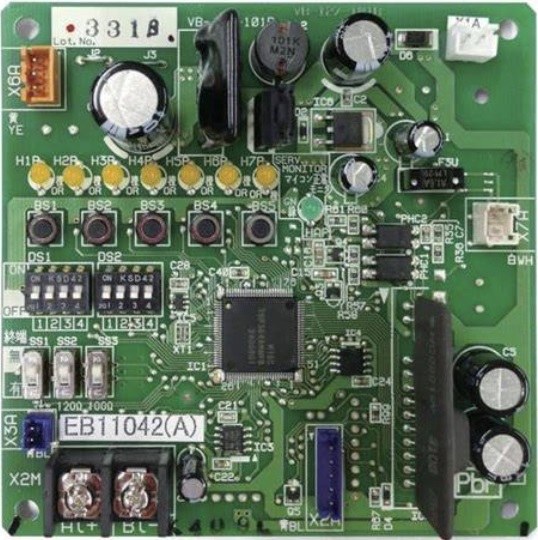
- Controls up to 64 indoor units (addresses 1-00 to 4-15) in up to 10 systems per adaptor. Boards with older firmware only serve addresses 1-00 to 1-15; the driver detects this on its own and uses only those addresses.
- Connects to the VRV system through the Daikin communication bus and to Control4 through its RS-485 output, using the RS-232/RS-485 converter.
Not compatible
- DCPA adaptors (e.g. DCPA01).
- Other Daikin interfaces, such as EKMBDXA, central controllers (iTM, Intelligent Touch) and BACnet or KNX interfaces.
- Third-party Modbus gateways for Daikin.
- Daikin splits and multi-splits that are not VRV.
Installation
- Set the DIP switches on the DTA board:
DS1 = 1:OFF, 2:ON, 3:OFF, 4:ON (19,200 bps, 1 stop bit, odd parity)
DS2 = 1:OFF, 2:OFF, 3:OFF, 4:ON (address 1) - Connect the adaptor's RS-485 terminal (A+/B-) to the controller's RS-232 serial port, using the RS-232/RS-485 converter.
- Install the two drivers of the package in Composer Pro.
- Add the ZoomDH – Daikin VRV DTA V2 driver to the room where the interface should appear.
- In Connections, connect the controller's serial port to the driver's Serial RS-232 connection.
- Enter the Adaptor ID (1 with the DIP switch settings above) and the License Key.
- Check that Adaptor Status shows Ready. The driver then discovers the indoor units and creates a thermostat for each one, in the same room as the driver.
- Move each thermostat to the right room and rename it if you want. The chosen name and room are kept.
Indoor unit discovery
- When the adaptor is ready, the driver reads which indoor units are connected and shows the list in Indoor Units Found.
- With Auto Create Indoor Units set to Yes (default), each indoor unit that has no thermostat yet gets a connected ZoomDH Universal HVAC Indoor Unit, named Daikin VRV Indoor Unit 1-00, using the indoor unit address (1-00 to 4-15).
- Indoor units that already have a connected thermostat are not duplicated.
- The list is read again every 5 minutes, so new indoor units in the system appear on their own.
- If you delete the thermostat of an indoor unit, it is not recreated automatically. To recreate it, use the Discover Indoor Units action or the Search indoor units button in the interface.
- With Auto Create Indoor Units set to No, add the thermostats manually and connect each one to the Indoor unit connection of the unit's address (e.g. Indoor unit 2-05).
Navigator interface
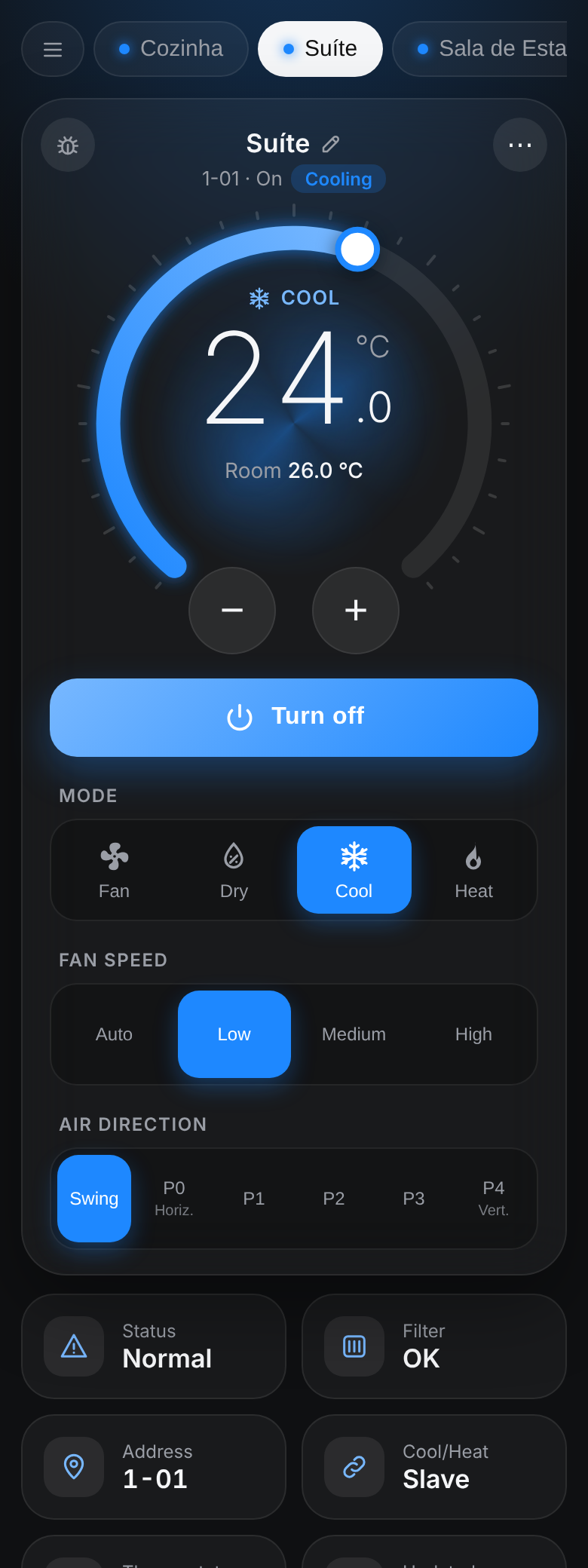
The driver appears as an icon in the room where it was added, on touchscreens and in the Control4 app. Tapping the icon opens the climate screen with the system's indoor units, with the same look as the ZoomDH Wi-Fi air conditioner drivers.
Interface components
| Element | Description |
|---|---|
| Indoor unit tabs | One tab per indoor unit shown on the screen. The dot takes the mode color when the unit is on, amber with an error and gray when off. With more than four units, the list button at the start opens all of them with temperature and mode for a quick pick. |
| Dial | Drag the dial or use − and + for the setpoint (0.5 °C or 1 °F steps). The center shows the mode and the room temperature. The arc color follows the mode: blue Cool, red Heat, green Auto, cyan Dry, gray Fan. Fan mode has no setpoint: the dial shows the room temperature. |
| Current operation | Next to the address the screen shows what the unit is doing (Cooling, Heating or Drying), and the dial center gets an animated glow in that operation's color. No glow when it is not operating, for example in Auto with the setpoint reached. |
| Turn on / Turn off | Turns the unit on in its last mode, or off. |
| Mode, Fan speed, Air direction | Only the options the unit supports are shown. Auto only appears on the Cool/Heat master. Air direction has Swing and the fixed positions P0 (horizontal) to P4 (vertical). |
| Data tiles | Status (normal, Daikin error code, Forced Off, sensor error, warning or no communication), filter, unit address, Cool/Heat master/slave, whether there is a thermostat in the project and the time of the last reading. |
| Rename (pencil) | The pencil next to the name changes the on-screen name right there. Confirm with Enter or by tapping outside the field. Leave it empty to go back to the thermostat name. |
| ⋯ menu | Removes the unit from the screen, lists hidden units to show them again, All off (tap twice to confirm), Refresh, Discover indoor units, the Setup page and the language (Português / English, saved on the device). |
| Debug (bug) | Shows below the panel the log of the screen's communication with the driver, with Copy and Clear buttons, to send to support. |
| Warnings | A banner at the top warns when the serial port is not connected, the adaptor does not respond or the license is invalid. |
Setup page
Opened from the ⋯ menu or from the Setup Page URL property in a browser on the same network. Lists all indoor units with address, name, thermostat and state, and lets you rename them, choose which ones stay on the screen, discover and refresh.
Names and on-screen choices are saved in the driver and apply to all devices.
Indoor units per room
When the driver shows up in several Navigator rooms, you can choose, for each room, which indoor units appear in the interface and which one opens first. This is on the setup page, in the Interface rooms box.
- A room is added to the box automatically the first time the interface is opened in it. You can also add one from the project's room list.
- Tick the indoor units that should appear and pick the default. A room without settings shows all of them.
- If the room can't be identified (for example, the interface opened from its direct address), all indoor units are shown.
Indoor unit status and errors
| Indication | Meaning |
|---|---|
| Error U4, A3… | Error code reported by the Daikin system. See the error table in the Daikin manual. It also appears in Last Error and fires the Indoor Unit Error event. |
| Sensor error | The indoor unit's temperature sensor has failed. |
| Communication error | The adaptor lost contact with the indoor unit. |
| Forced Off | The indoor unit was turned off by the Daikin system (for example, by a forced-off contact) and cannot be turned on until it is released. |
| Clean filter | The indoor unit is asking for a filter cleaning. Fires the Filter Sign event. |
| Cool/Heat Master / Slave | In systems with automatic changeover, the master indoor unit chooses between cool and heat for the other units on the same outdoor unit. |
The Indoor Unit Error, Indoor Unit Error Cleared and Filter Sign events can be used in programming, for example to send a notification.
Commands when the Daikin remote is also used
The driver reads all indoor units every Status Poll Interval (s), so changes made on the Daikin remote appear in Control4 within that interval.
- Command Check = On (default): after each command, the driver checks the indoor unit's state and resends up to 2 times if it was not accepted.
- Power Command Method = Direct (default): the command is sent right away.
- Power Command Method = Read Before Sending: the driver reads the indoor unit's state before each command. Recommended on sites where the original Daikin remote is also used, since it prevents a command from being ignored after someone changed the unit on the remote.
- Power Command Method = Force Change: the driver always resends on/off in a way the board treats as a new command, without reading first. It is faster than reading before sending and also suits sites where the Daikin remote is used.
Upgrading existing projects
When upgrading a project that already uses this driver, the existing thermostats stay connected and are not duplicated. The Navigator interface uses a new kind of icon that Control4 only creates when the driver is added. To get the interface in an existing project:
- Note which Indoor unit N connection each thermostat is connected to. In the new driver, the old Indoor unit 0 connection is called Indoor unit 1-00, Indoor unit 1 is Indoor unit 1-01, and so on.
- Remove the old ZoomDH – Daikin VRV DTA V2 driver and the ZoomDH Daikin Modbus Bridge, which is no longer used, from the project. The thermostats stay in the project, with their programming.
- Add the new driver and enter the Adaptor ID and License Key.
- Before connecting the serial port, connect each existing thermostat to its Indoor unit 1-NN connection. This way no thermostat is duplicated.
- Connect the controller's serial port to the driver's Serial RS-232 connection. Indoor units without a thermostat get a new one automatically.
The license key stays the same.
Properties
| Property | Description |
|---|---|
| License Key | Driver license key. |
| License Status | License status and update information. |
| Control4 MAC Address | Controller MAC, used for licensing. |
| Driver Name / Driver Version | Name and version of the installed driver. |
| Log Level | Log detail level (0=Alert … 5=Trace). |
| Log Mode | Log output: Off / Print / Log / Print and Log. |
| Driver Information | Driver status messages. |
| Connection Status | Serial port connection status. |
| Adaptor ID | Modbus address of the DTA adaptor. Default: 1. |
| Adaptor Status | Daikin adaptor status: Ready or Not ready. |
| Indoor Units Found | Number and addresses of the indoor units found on the adaptor. |
| Auto Create Indoor Units | Yes (default): creates and connects a thermostat for each indoor unit found. No: thermostats are added manually. |
| Status Poll Interval (s) | Interval for reading all indoor units: 15, 30 (default), 60 or 120 seconds. |
| Power Command Method | Direct (default), Read Before Sending or Force Change. See Commands when the Daikin remote is also used. |
| Command Check | On (default): checks and resends commands that were not accepted. Off: no check. |
| Temperature Scale | Temperature scale in the Navigator interface: Celsius (default) or Fahrenheit. Thermostats follow the Control4 project scale. |
| Web Page Port | Interface port on the controller (default 8101). Each driver with an interface needs a different port; change it if another driver already uses 8101. |
| Web UI URL | Interface address, with the access key. Filled in by the driver. |
| Setup Page URL | Setup page address, to open in a browser on the same network. Filled in by the driver. |
| Last Error | Last error reported by an indoor unit, with date and time. |
Actions
| Action | Description |
|---|---|
| All Off | Turns off every indoor unit shown in the interface. Also available as a command in programming. |
| Discover Indoor Units | Reads the adaptor's indoor unit list again and creates the missing thermostats, including deleted ones. |
| Get Units Capabilities | Reads the features of each indoor unit (available modes and speeds). |
| Get Units Status | Updates the state and temperature of all indoor units. |
| Get Adaptor Status | Reads the status of the DTA adaptor. |
| Resend Web URL | Sends the interface address to the Navigator icon again. Use it if the icon opens a blank screen. |
| New Web Key | Changes the interface access key. Old addresses stop working. |
Connections
| Connection | Use |
|---|---|
| Serial RS-232 | Controller serial port, connected to the adaptor through the RS-232/RS-485 converter (19,200 bps, 8 bits, odd parity, 1 stop bit). |
| Indoor unit 1-00 to Indoor unit 4-15 | One connection per indoor unit, by unit address. Connected automatically to the thermostat created by discovery. |
Troubleshooting
- The interface opens blank or with "Chave invalida": run the Resend Web URL action and close and reopen the app. If another driver uses the same port, change Web Page Port.
- Adaptor Status is Not ready or there is no response: check the DIP switches, the A+/B- wiring and that the RS-232/RS-485 converter is powered.
- Thermostats were not created: check that the ZoomDH Universal HVAC Indoor Unit driver is installed in Composer and that Auto Create Indoor Units is Yes, then run Discover Indoor Units. The reason appears in Driver Information.
- Indoor unit missing from Indoor Units Found: the adaptor does not see the unit. Check the unit's wiring on the VRV system.
- Indoor units at addresses 2-00 to 4-15 do not appear: the board has firmware that only serves 1-00 to 1-15. Ask Daikin about updating the DTA116A51 firmware.
- Unit with a communication error in the interface: the adaptor lost contact with the indoor unit. Check the unit and the VRV system wiring.
- The interface icon does not appear in an existing project: see Upgrading existing projects.
- A command was not accepted when the Daikin remote is also used: set Power Command Method to Force Change or Read Before Sending. A "command not confirmed" warning appears in Driver Information.
- Indoor unit does not turn on and shows Forced Off: it was turned off by the Daikin system; release the forced off on the system.
- Speeds or modes missing on the thermostat: run Get Units Capabilities.
- License deactivated right after entering the key: the controller needs internet access.
Licensing
- 7-day trial included; remaining time shown in License Status.
- After purchasing a license, enter the key in License Key. The status changes to Activated.
- The controller needs internet access for activation and periodic re-verification.
- Licenses: drivers@zoomdigitalhome.com.br
- Once a day, also during the trial, the driver reports technical data of the installation to the license server (controller model and version, driver version, project name and license state). No personal data is sent. When a new driver version is available, it shows in License Status with the link to the driver page on the website.
What the license controls
| Operation | Trial active | Trial expired |
|---|---|---|
| Serial port connection | OK | OK |
| Opening the Navigator interface | OK | OK |
| Commands to the adaptor and indoor units (thermostats and interface) | OK | Blocked |
| Reading indoor unit status and temperature | OK | Blocked |
| All Off, show/hide and rename in the interface | OK | Blocked |
| Automatic thermostat creation | OK | Blocked |
Support and Updates
- Website: www.zoomdigitalhome.com.br
- Support: drivers@zoomdigitalhome.com.br
Release Notes
| Version | Date | Description |
|---|---|---|
| 20261111 | 11/11/2026 | The driver now reports the installation's technical data to the license server once a day, which speeds up support. It also shows in License Status when a new driver version is available. |
| 20261023 | 23/10/2026 | Navigator interface with the new look of the ZoomDH air conditioner drivers, with a setpoint dial, indoor unit tabs, All off and a setup page. Per-room choice of which indoor units appear on screen. New icon. |
| 20261017 | 17/10/2026 | Navigator interface with all indoor units. Automatic discovery, with one thermostat created per indoor unit. Daikin error codes, filter sign and Cool/Heat master. Up to 64 indoor units and direct connection to the controller serial port. More reliable commands. Requires OS 3.3. |
| 20260803 | 03/08/2026 | New version compatible with the Universal HVAC Indoor Unit driver. |
| 308 | 15/05/2026 | Internal fixes when reading indoor unit status. |
| 307 | 09/04/2024 | Communication improvements with the adaptor. |
| 306 | 06/06/2024 | Added support for the multiple thermostat control driver. |
| 305 | 28/04/2024 | Added support for indoor units with 5 fan speeds. |
| 304 | 17/07/2023 | New driver architecture, with support for multiple outdoor units. |
| 303 | 28/09/2022 | Documentation update. |
| 302 | 22/08/2022 | Updated the status synchronization of the indoor units. |
| 300 | 04/04/2022 | Initial release. |