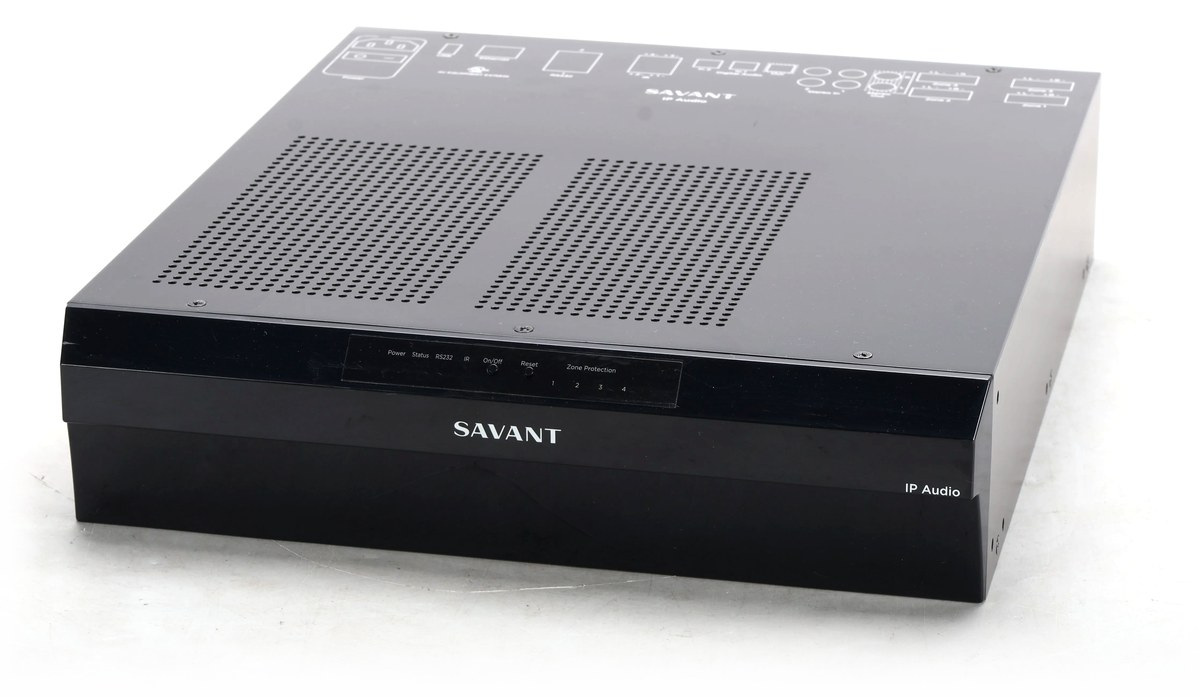
Este driver integra o amplificador Savant IP Audio 50 (SIPA 50, PAV-SIPA50SM) ao sistema Nice/ELAN pela rede local, sem precisar de host Savant. O SIPA 50 tem 4 zonas amplificadas, uma saída de linha, uma saída digital e 5 entradas, incluindo o streamer interno.
O driver é instalado como Zone Controller (áudio multiroom). Cada saída aparece no ELAN como uma zona, com power, fonte, volume e mute.
Recursos suportados
Power, fonte, volume e mute por zona, com retorno do estado real.
Ligar a zona volta para a última fonte usada nela.
Modo estéreo ou mono nas zonas 1 a 4, como opção de zona.
DSP da saída 5 (processado ou direto), como opção de zona.
Trim das entradas e desligar todas as saídas pelo Event Mapper.
Atualização de estado: mudanças feitas por fora (interface web, app) aparecem no ELAN na consulta seguinte.
Status de comunicação: o dispositivo fica vermelho no ELAN quando o SIPA para de responder ou recusa o usuário e a senha.
Firmware do SIPA mostrado na configuração do driver.
Qualquer recurso não especificamente indicado como suportado deve ser considerado sem suporte. A saída 6 (digital) tem nível fixo, então não tem controle de volume.
Pré-requisitos
SIPA 50 na mesma rede do controlador ELAN, de preferência com IP fixo ou reserva no DHCP.
Usuário e senha da interface web do SIPA (padrão de fábrica: RPM / RPM).
Sem host Savant controlando o mesmo SIPA. Com um host Savant ativo na rede, ele pode sobrescrever o que o ELAN mandar.
Internet no controlador para ativar a licença.
Entradas e saídas
Zona no ELAN
Saída do SIPA
Observação
Zona 1 a Zona 4
Saídas 1 a 4
Amplificadas. Volume, mute e modo estéreo/mono.
Saida 5 (Linha)
Saída 5
Saída de linha com DSP. No modo direto o SIPA leva o volume a 0 dB.
Saida 6 (Digital)
Saída 6
Digital, nível fixo. Só fonte e mute.
Fonte no ELAN
Entrada do SIPA
Digital 1 (Optica)
Entrada 1, óptica
Digital 2 (Optica)
Entrada 2, óptica
Analogica 3
Entrada 3, RCA
Analogica 4
Entrada 4, RCA
Streamer Savant
Entrada 5, streamer interno
O volume de 1% a 100% no ELAN corresponde a −59 dB a 0 dB no SIPA. Volume 0% deixa a zona em silêncio.
No Nice Configurator, abra a guia Media e adicione um Zone Controller. Clique em Import..., aponte para o arquivo ZoomDH_Savant_SIPA50.edrvc e clique em OK.
Se o driver não aparecer na lista, clique em Show All.
Selecione ZoomDH Savant IP Audio 50, informe o IP do SIPA (porta 80) e clique em Install.
Se o usuário e a senha do SIPA não forem os de fábrica, preencha User Name e Password. Em branco, o driver usa RPM / RPM.
Insira a chave de licença no campo License Key, após adquiri-la, e confira o License Status.
Renomeie as zonas e as fontes conforme a instalação e associe as fontes aos dispositivos de mídia do ELAN.
Campos de configuração
Campo
Descrição
IP Address
IP do SIPA 50. Porta 80.
User Name / Password
Login da interface web do SIPA. Em branco = RPM / RPM.
License Key
Chave de licença para uso do driver.
License Status
Status da licença e tempo restante de avaliação (somente leitura).
Driver Information
Mensagens de status do driver em tempo real (somente leitura).
Developer Debug
Ativa log detalhado, com cada requisição enviada ao SIPA. Deixe desativado em uso normal.
Status Poll Time (s)
Intervalo entre leituras de estado (padrão 5 s, mínimo 2 s).
Firmware
Versão de firmware do SIPA (somente leitura).
Opções de zona
Nome
Valores
Descrição
Modo
Estereo / Mono
Só nas zonas 1 a 4.
DSP
Processado / Direto
Só na Saida 5. Ao voltar para Processado, o volume anterior não é restaurado pelo SIPA.
Comandos (Event Mapper)
Pela ação Send Command... do driver:
Comando
Função
AllOff
Desliga todas as saídas.
Trim <entrada> <dB>
Ajusta o trim de uma entrada (1 a 5) de −10 a 10 dB. Exemplo: Trim 3 4.
Refresh
Lê o estado do SIPA na hora.
Solução de problemas
Dispositivo vermelho, "Sem resposta do SIPA": confira o IP e se o SIPA abre no navegador pelo mesmo IP.
"Usuario/senha recusados": confira User Name e Password. São os mesmos da interface web do SIPA.
O que o ELAN manda volta sozinho: há um host Savant controlando o SIPA. Desligue-o ou remova o SIPA da configuração dele.
Comandos não funcionam: confira o License Status. Sem licença válida, o driver não envia comandos nem atualiza o estado das zonas.
Diagnóstico: ative o Developer Debug para ver no log cada requisição enviada e a resposta do SIPA.
Licenciamento
Este driver funciona por um período de avaliação de 7 dias. Após esse período, é necessário inserir uma chave de licença para continuar operando.
A chave é inserida no campo License Key. As licenças são emitidas e vinculadas por controlador ELAN.
Sem licença válida, o driver não envia comandos nem atualiza o estado das zonas.
This driver integrates the Savant IP Audio 50 amplifier (SIPA 50, PAV-SIPA50SM) with the Nice/ELAN system over the local network, with no Savant host required. The SIPA 50 has 4 amplified zones, a line output, a digital output and 5 inputs, including the built-in streamer.
The driver installs as a Zone Controller (multiroom audio). Each output appears in ELAN as a zone, with power, source, volume and mute.
Supported features
Power, source, volume and mute per zone, with real state feedback.
Turning a zone on returns to the last source used in it.
Stereo or mono mode on zones 1 to 4, as a zone option.
Output 5 DSP (processed or direct), as a zone option.
Input trim and all outputs off from the Event Mapper.
State updates: changes made elsewhere (web interface, app) show up in ELAN on the next poll.
Communication status: the device turns red in ELAN when the SIPA stops responding or rejects the user name and password.
SIPA firmware shown in the driver configuration.
Any feature not specifically listed as supported should be considered unsupported. Output 6 (digital) is fixed level, so it has no volume control.
Prerequisites
SIPA 50 on the same network as the ELAN controller, preferably with a static IP or DHCP reservation.
SIPA web interface user name and password (factory default: RPM / RPM).
No Savant host controlling the same SIPA. An active Savant host on the network may overwrite what ELAN sends.
Internet access on the controller to activate the license.
Inputs and outputs
ELAN zone
SIPA output
Notes
Zona 1 to Zona 4
Outputs 1 to 4
Amplified. Volume, mute and stereo/mono mode.
Saida 5 (Linha)
Output 5
Line output with DSP. In direct mode the SIPA sets volume to 0 dB.
Saida 6 (Digital)
Output 6
Digital, fixed level. Source and mute only.
ELAN source
SIPA input
Digital 1 (Optica)
Input 1, optical
Digital 2 (Optica)
Input 2, optical
Analogica 3
Input 3, RCA
Analogica 4
Input 4, RCA
Streamer Savant
Input 5, built-in streamer
ELAN volume from 1% to 100% maps to −59 dB to 0 dB on the SIPA. Volume 0% silences the zone.
In Nice Configurator, open the Media tab and add a Zone Controller. Click Import..., select the ZoomDH_Savant_SIPA50.edrvc file and click OK.
If the driver is not listed, click Show All.
Select ZoomDH Savant IP Audio 50, enter the SIPA IP (port 80) and click Install.
If the SIPA user name and password are not the factory ones, fill in User Name and Password. Left blank, the driver uses RPM / RPM.
Enter the license key in the License Key field once purchased, and check License Status.
Rename zones and sources for the installation and link the sources to ELAN media devices.
Configuration fields
Field
Description
IP Address
SIPA 50 IP address. Port 80.
User Name / Password
SIPA web interface login. Blank = RPM / RPM.
License Key
License key for the driver.
License Status
License status and remaining trial time (read-only).
Driver Information
Real-time driver status messages (read-only).
Developer Debug
Enables detailed logging, with every request sent to the SIPA. Leave off in normal use.
Status Poll Time (s)
Interval between status reads (default 5 s, minimum 2 s).
Firmware
SIPA firmware version (read-only).
Zone options
Name
Values
Description
Modo
Estereo / Mono
Zones 1 to 4 only.
DSP
Processado / Direto
Saida 5 only. When switching back to Processado, the SIPA does not restore the previous volume.
Commands (Event Mapper)
Through the driver's Send Command... action:
Command
Function
AllOff
Turns off all outputs.
Trim <input> <dB>
Sets the trim of an input (1 to 5) from −10 to 10 dB. Example: Trim 3 4.
Refresh
Reads the SIPA state right away.
Troubleshooting
Device red, "Sem resposta do SIPA": check the IP and that the SIPA opens in a browser at the same IP.
"Usuario/senha recusados": check User Name and Password. They are the same as the SIPA web interface.
Changes sent from ELAN revert on their own: a Savant host is controlling the SIPA. Turn it off or remove the SIPA from its configuration.
Commands do not work: check License Status. Without a valid license the driver does not send commands or update zone state.
Diagnostics: enable Developer Debug to see every request sent and the SIPA response in the log.
Licensing
This driver runs for a 7-day trial period. After that, a license key is required to keep it working.
The key goes in the License Key field. Licenses are issued and bound per ELAN controller.
Without a valid license the driver does not send commands or update zone state.