
ZoomDH – Sensibo Cloud v2026102405
Overview
Integrates Sensibo air conditioner controllers (Sky, Air, Air Pro and Elements) with Crestron Home. The driver uses the official Sensibo cloud API with the API key of the customer's account and creates one Crestron Home thermostat for each Sensibo in the account.
- Automatic discovery of the account's Sensibo units. Each one shows up as a thermostat named after its room in the Sensibo app.
- Thermostat with setpoint and room temperature, power, Cool, Heat, Auto, Dry and Fan modes, fan level and swing.
- Only the options each air conditioner accepts in the current mode are shown, as reported by Sensibo.
- Turns Climate React on and off and shows the temperature and humidity measured by the Sensibo.
- Changes made with the remote or the Sensibo app show up in Crestron Home on the next poll (every 30 seconds by default).
- Page texts in Portuguese or English, chosen in the driver configuration.
- Programmable commands for scenes and events: power on, power off, modes and setpoint up/down.
Prerequisites
- Sensibo already set up in the Sensibo app and connected to the customer's Wi-Fi.
- API key of the customer's Sensibo account, created at home.sensibo.com/me/api.
- Crestron Home processor with internet access.
- ZoomDH license key (without a key the driver runs as a 30-day trial).
Installation
- Import ZoomDH_Sensibo_Cloud.pkg into the processor with the Crestron Home Setup app (or copy it by SFTP to
/user/ThirdPartyDrivers/Import). - In Setup, add the device Sensibo → Sensibo Cloud (Platform type) to a room.
- Fill in the configuration (see below) and save. Within about 30 seconds the driver reads the account and finds the Sensibo units.
- In Pair Devices, open the Sensibo Cloud room and click the ‹ arrow on the driver row. The left column lists the Sensibo units found: click + on each one and choose its room.
The processor only replaces the driver when the package version changes. To update, import the new version and use Check for Driver Update.
Configuration
| Field | Description |
|---|---|
| Sensibo API Key | Key created at home.sensibo.com/me/api with the customer's account (masked). |
| Temperature Units | Celsius or Fahrenheit, for setpoint and room temperature. |
| Poll Interval (seconds) | How often the cloud is read, from 15 to 300 seconds (default 30). Lower values react faster to the Sensibo app but use more of the API rate limit. |
| UI Language / Idioma | Portuguese or English: language of the driver pages. |
| License Key | ZoomDH license key. Empty = 30-day trial. |
Page in the Crestron Home app
Each Sensibo has a page with the thermostat and the air conditioner controls. The room tile shows the mode, setpoint and room temperature (e.g. Cool 24° • 30.0°).
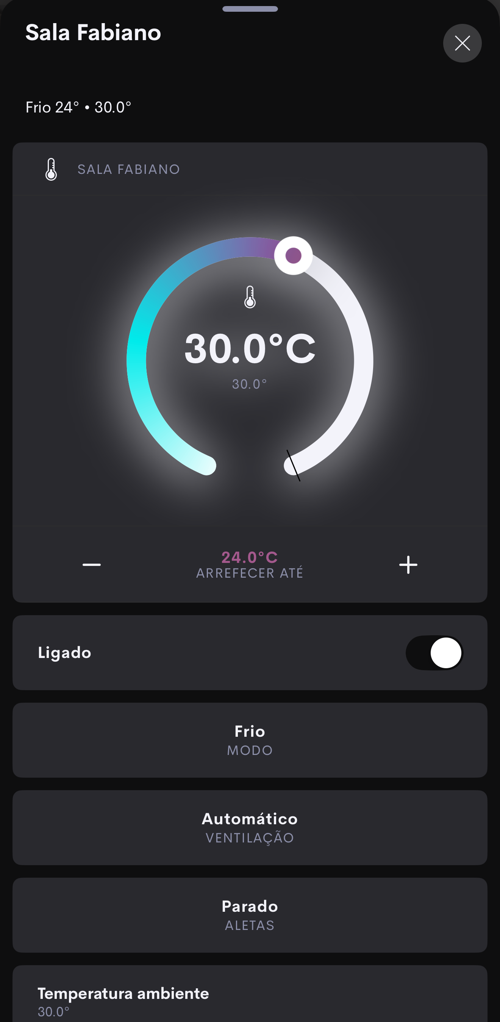
- Thermostat: setpoint with − and + and room temperature. Hidden in Fan mode, which has no setpoint. Quick presses become a single command, sent about 1 second after the last one.
- Power: turns the air conditioner on and off.
- Mode, Fan and Swing: only the options the unit accepts in the current mode are shown.
- Climate React: turns on and off the Climate React automation already set up in the Sensibo app.
- Room temperature and humidity measured by the Sensibo.
The Sensibo Cloud device also has a page with the connection status, the number of units, the Synchronize button and the license status with the Check button.
Programmable commands
| Device | Commands |
|---|---|
| Sensibo Cloud | Refresh Now (reads the cloud right away) and Check License. |
| Each Sensibo | Power On, Power Off, Toggle Power, Mode Cool, Mode Heat, Mode Auto, Mode Dry, Mode Fan, Setpoint Up and Setpoint Down. |
Troubleshooting
- "Invalid API key": check the key at home.sensibo.com/me/api. If it was deleted there, create another one and save it again in the configuration.
- "Sensibo rate limit reached": the Sensibo cloud throttled the polls. The driver waits longer between polls on its own (up to 5 minutes). If it keeps happening, raise the Poll Interval.
- "Control not available" on the thermostat: the unit is offline. This happens when the Sensibo has no Wi-Fi (check the Sensibo app) or when the processor cannot reach the cloud for 3 polls in a row.
- A new Sensibo does not show up: use Synchronize on the Sensibo Cloud page and then pair the new unit.
- Commands ignored: the trial is over or the key is invalid. The Sensibo Cloud page shows "License invalid or trial expired".
Licensing
- ZoomDH license entered in License Key. Without a key the driver runs as a 30-day trial.
- The license status shows on the Sensibo Cloud page (e.g. Teste: 30 dias or Ativa), with the Check button to query it again.
| Without a valid license | Effect |
|---|---|
| Cloud polling | Stopped: the thermostats go offline. |
| Commands (page and programming) | Ignored. |
- The thermostats have no license of their own: they use the Sensibo Cloud one.
Support and Updates
- Website: www.zoomdigitalhome.com.br
- Support: drivers@zoomdigitalhome.com.br
Release Notes
| Version | Date | Description |
|---|---|---|
| 2026102405 | 10/24/2026 | First release: the account's Sensibo units as Crestron Home thermostats, with setpoint, power, modes, fan level, swing, Climate React, temperature and humidity, programmable commands, Portuguese/English pages and ZoomDH license. |