
ZoomDH – Universal Scheduler v20261101
Overview
The Universal Scheduler lets the customer create and change schedules from the Navigator (touch screens, phones and tablets, at home or away), without calling the integrator and without touching Composer programming.
- Fixed time, sunrise and sunset, dawn and dusk, with an offset of up to 6 hours before or after.
- Weekdays, individual dates, once, or every N days (e.g. garden irrigation every other day).
- Only part of the year (e.g. Christmas lights from Dec 1 to Jan 6), skip on holidays, random offset for presence simulation.
- Pause all (vacation) with automatic resume on a date, and "skip next" per schedule.
- Each schedule can set lights, activate lighting scenes, run project macros, move shades, switch relays (including a pulse for gates), change the HVAC mode and fan, control rooms (watch or listen to a source, volume, mute, room off) and fire programmed actions defined by the integrator, with a delay per action (e.g. start irrigation and stop it 20 minutes later).
- Timers: a countdown of up to 23h59 that runs the same actions when it ends (e.g. water the garden for 20 minutes, turn the TV off in 1 hour).
- The integrator decides what the customer may use and how much they may change.
Prerequisites
- Control4 controller with OS 3.0 or later.
- Project location set in Composer (for sunrise/sunset), or Latitude/Longitude in the driver properties.
- Correct date, time and time zone on the controller.
- Optional: ZoomDH Universal Notifier to notify the customer when a schedule runs.
Installation
- Add the ZoomDH – Universal Scheduler driver to the project (one per project is usually enough).
- Under Devices available to the customer, select the lights, shades, relays, thermostats and rooms the customer may use. Under Lighting Scenes and Macros, choose whether the project's advanced lighting scenes and macros are offered to the customer.
- In Number of Actions and Action N Name, create the programmed actions (e.g. "Dinner Scene", "Vacation Mode") and program each one in the Programming tab (event with the same name).
- Choose in End User Editing how much the customer may change.
- Make the icon visible in the Navigator in the desired rooms (Navigator → Menu Settings, Comfort experience by default).
Navigator interface
Tap the Universal Scheduler icon. The icon changes while schedules are paused.
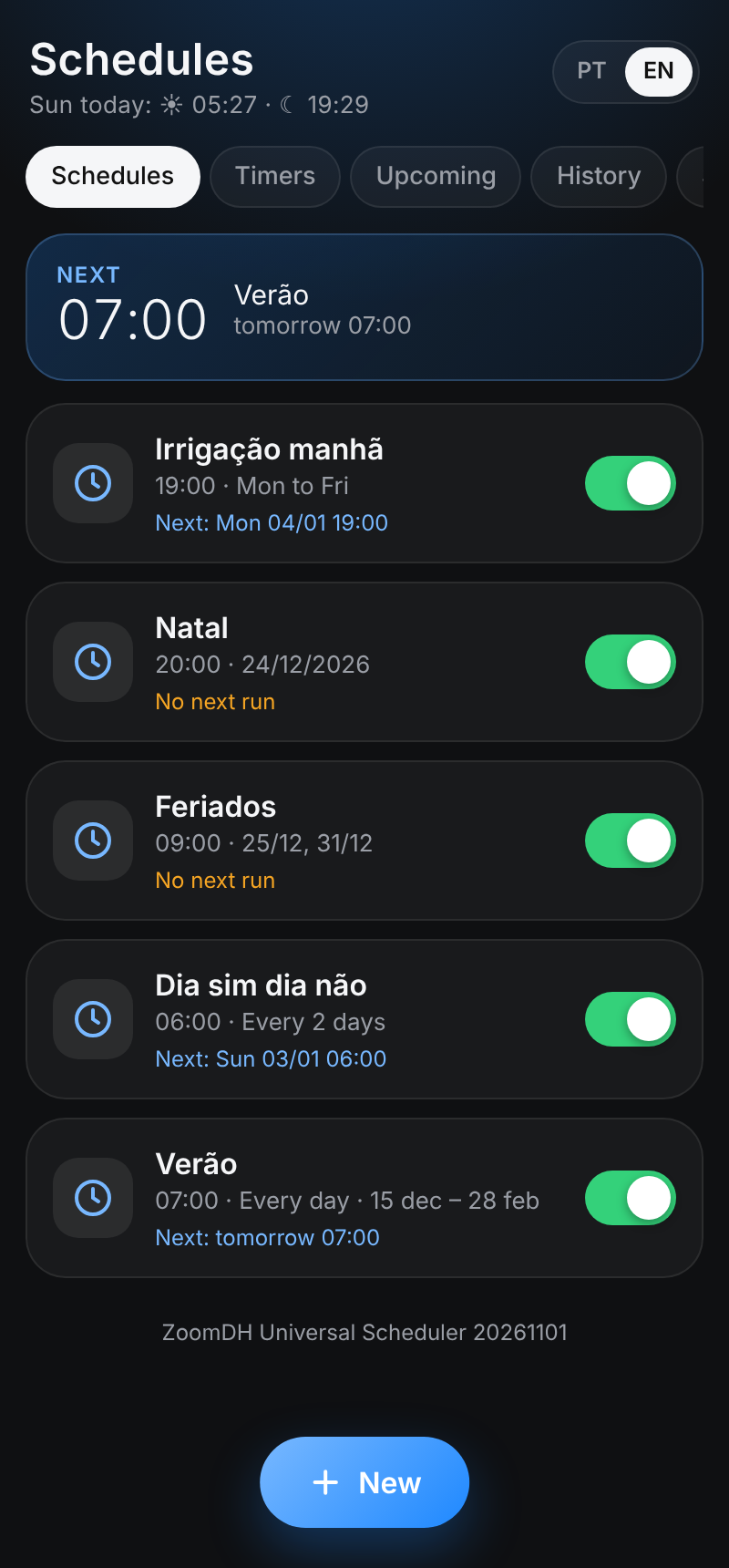
- Schedules: list with a summary (when, days, season) and the next run. Tap to edit; the switch turns it on/off; New creates one.
- Timers: countdowns ready to start, with the time left and the end time (see Timers).
- Upcoming: what runs in the next 7 days and today's sun times.
- History: the latest runs (automatic, from the screen, from programming or by a timer), including skipped ones.
- Settings: pause all (with a date to resume automatically), holidays and exceptions (single date or every year) and language.
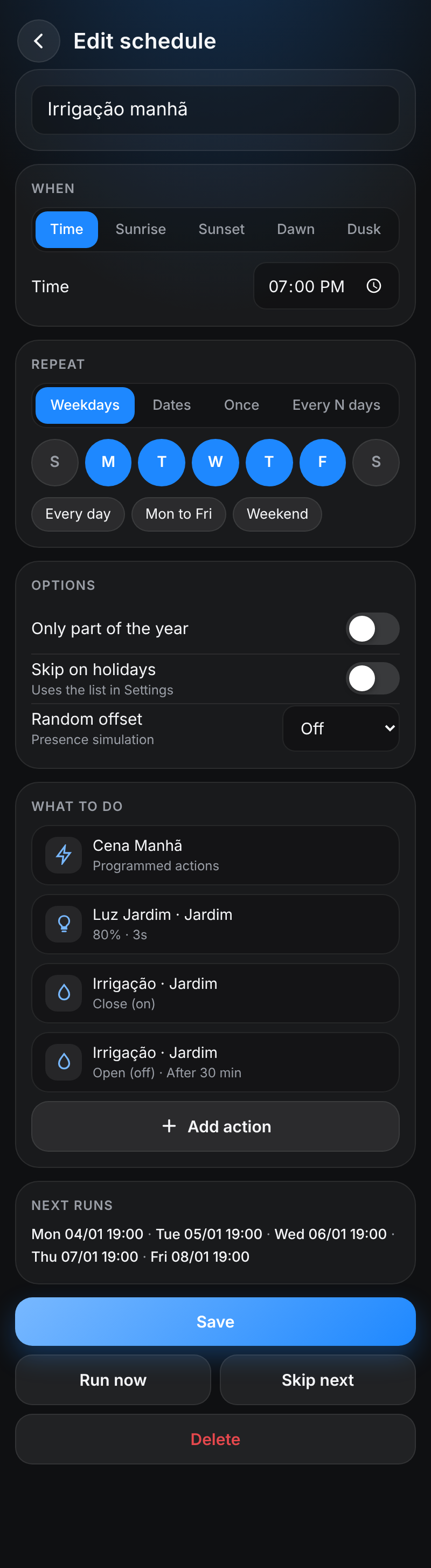
The editor also has Run now (tests the actions), Skip next and Delete.
When it runs
| Option | How it works |
|---|---|
| Time | Fixed hour and minute. |
| Sunrise / Sunset | Calculated every day for the project location, with an offset of up to 6 hours before or after (5-minute or 1-hour steps). |
| Dawn / Dusk | Start and end of civil twilight (bright sky without sun, about 25 min before sunrise and after sunset). |
| Weekdays | Pick the days, with shortcuts Every day, Mon to Fri and Weekend. |
| Dates | List of individual dates (up to 60). |
| Once | Runs on the chosen date and then turns itself off. |
| Every N days | From a start date (e.g. every 2 days). |
| Only part of the year | From one day/month to another; may cross the new year (December to February). |
| Skip on holidays | Uses the holidays and exceptions list in Settings. |
| Random offset | Moves the time by up to ± N minutes, different every day (presence simulation). |
If the controller is off at the scheduled time, the schedule does not run late afterwards (only if it comes back within 3 minutes). A schedule never runs twice for the same time, even if the driver restarts.
What it does (actions)
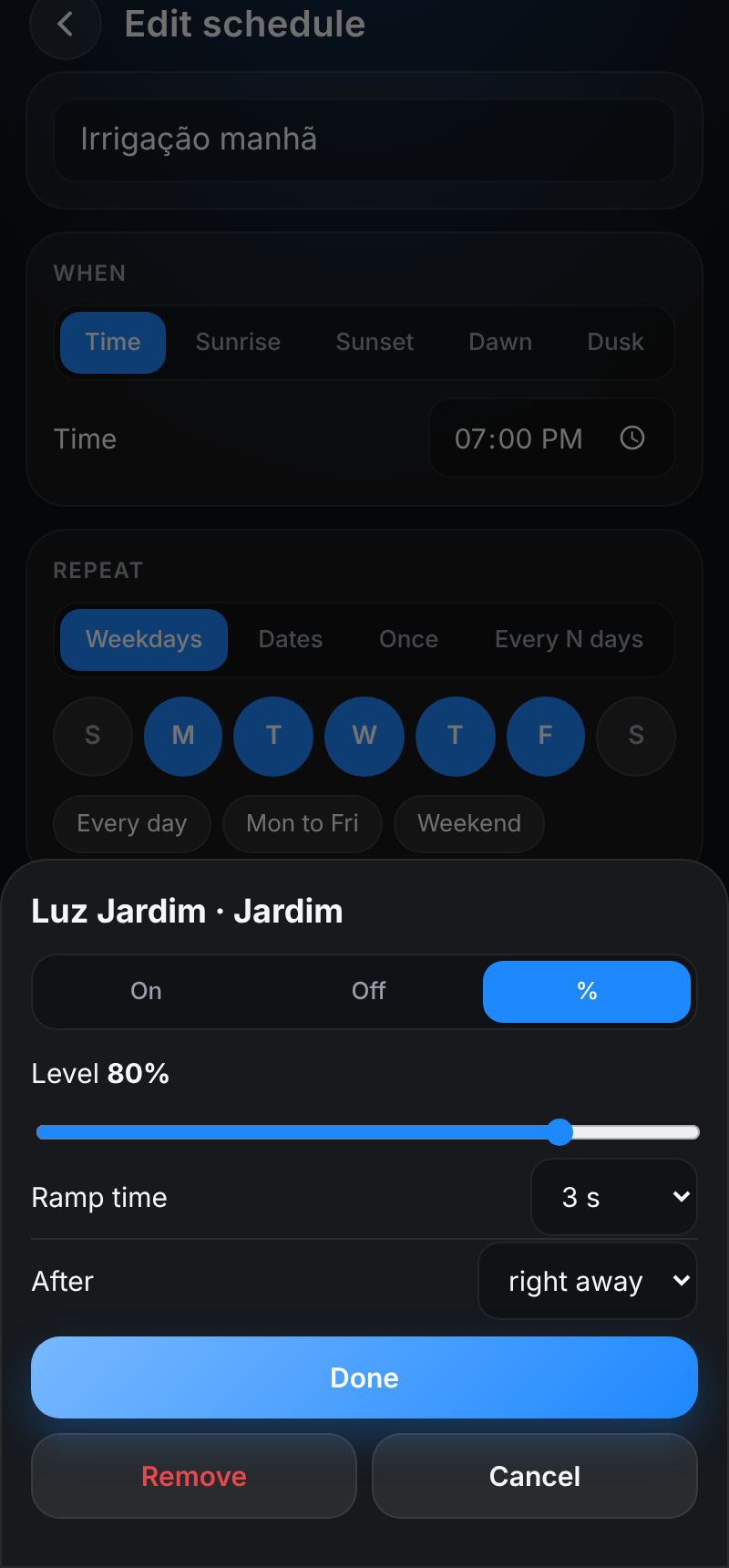
| Type | Options |
|---|---|
| Programmed action | Fires the event with the action name; what happens is what the integrator programmed. |
| Lights | On, off or level (%), with ramp time. |
| Shades | Open, close, position (%) or stop. |
| Lighting scenes | Activate, deactivate or toggle a scene from the project's advanced lighting. |
| Macros | Run a project macro. |
| Relays | Close (on), open (off), toggle or pulse (closes for 0.5 to 30 seconds and opens, for gates and locks). Ideal for irrigation, pumps and gates. |
| Climate | Mode (off, cool, heat, auto, dry, fan or keep), temperature and fan (auto, on, circulate, low, medium, high). |
| Rooms | Turn the room off, volume (%), mute on/off/toggle, watch or listen to a room source. |
After: each action can wait from 1 minute to 4 hours after the schedule time. Delayed actions still run if the controller restarts in between.
Only the devices selected in the properties are shown. If the integrator removes a device from the list, actions using it stop being executed.
Room sources are the same ones offered in Watch and Listen on the Navigator. Radio stations, favorites and playlists are not available yet: use a programmed action for them.
Timers
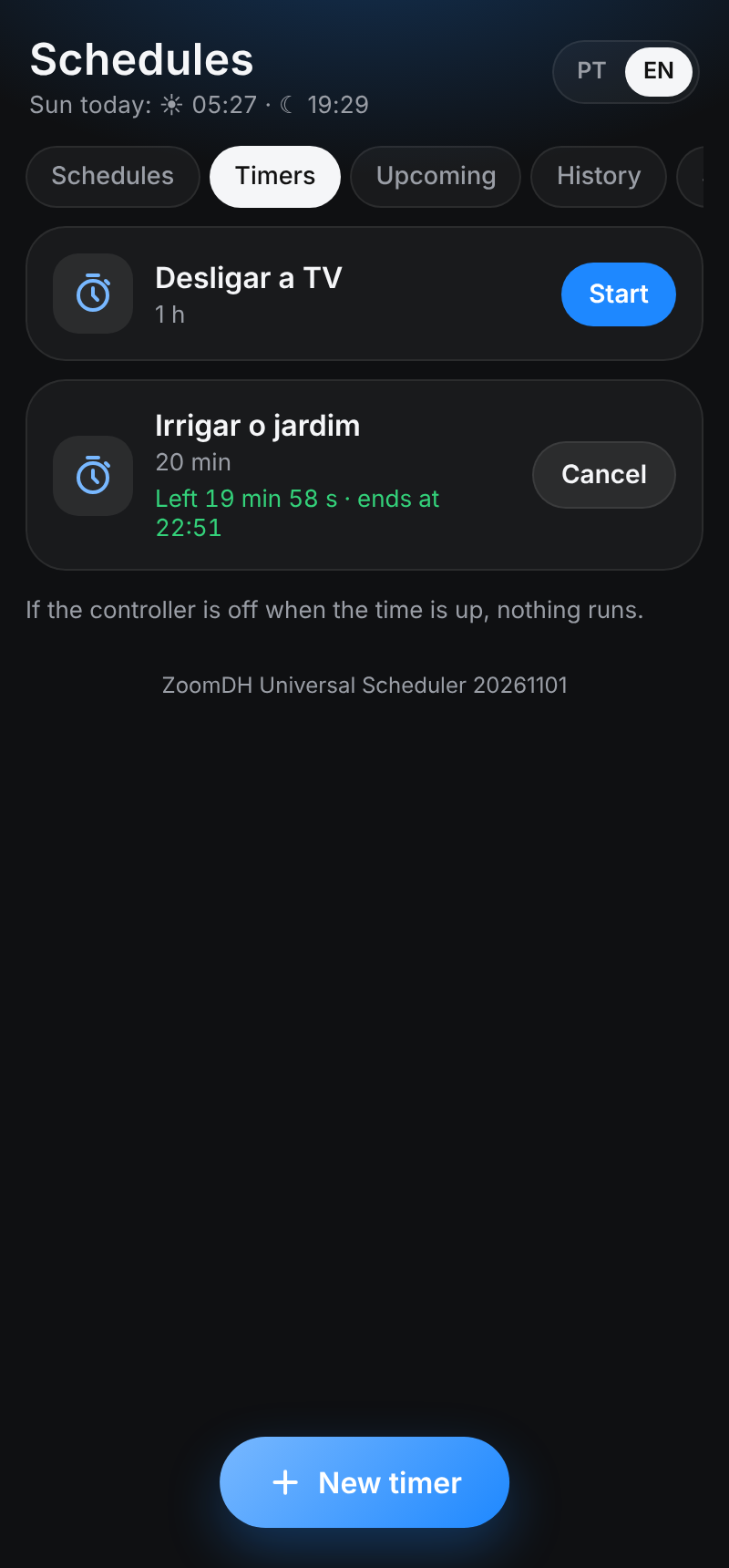
- In the Timers tab, the customer creates a timer with a name, a duration (up to 23h59) and the same actions as schedules, delays included.
- Start begins the countdown; Cancel stops it without running anything. The editor can start it with a different duration for that run only.
- The countdown survives a controller restart. For safety, if the time runs out while the controller is off, nothing runs (it is noted in the history).
- Timers are not affected by the general pause of schedules.
Properties
| Property | Description |
|---|---|
| License Key / License Status | ZoomDH license (see Licensing). |
| Status | Active (how many enabled), Paused (until when) or invalid license. |
| Next Run | Next schedule and time. |
| Sunrise / Sunset Today | Today's sunrise and sunset, to check the location. |
| End User Editing | Full: the customer can do everything. Times Only: only times, days, options, on/off, skip, pause, starting/cancelling timers and changing their duration (cannot create, delete, rename or change actions). View Only: read only. |
| Language | Language of the screen and driver texts: Automatic (the controller's), Português or English. It can also be changed in Settings, on the screen. |
| Latitude / Longitude | Empty uses the project location. Fill in only if the project has no location. |
| Temperature Scale | Temperature scale on the screen (Celsius or Fahrenheit). |
| Send Notifications | With the Notifier connected, Off turns off notifications for all schedules. |
| Number of Actions / Action N Name | How many programmed actions exist (up to 20) and their names. Renaming keeps the programming. |
| Lights, Shades, Relays, Thermostats, Rooms | Devices the customer may use. |
| Lighting Scenes / Macros | Show offers the project's advanced lighting scenes and macros to the customer; Hide hides them and does not run them. |
| Backup Data | Backup text (see Actions). |
| Log Level / Log Mode / ZOOMDH Debug | Logging and support. |
Composer actions
| Action | What it does |
|---|---|
| Show History | Shows in the Lua tab the last 60 runs (schedules and timers: started, finished, cancelled), with date, time and origin. Useful to check what ran. |
| Show Schedules | Prints the schedules and what runs in the next 7 days in the Lua tab. |
| Export Backup | Copies all schedules and holidays to the Backup Data property. |
| Import Backup | Replaces the schedules with the content of Backup Data (to replace the driver or copy to another project). |
| Clear History | Clears the history. |
| Recalculate Sun Times | Reads the project location again. |
Programming
Events
- One per programmed action, named after the action (e.g. "Dinner Scene").
- Schedule Executed: any schedule ran (name in LAST_SCHEDULE).
- Scheduler Paused / Scheduler Resumed.
- Timer Started / Timer Finished: a timer started or finished (name in LAST_TIMER).
Commands
- Run Schedule, Enable Schedule, Disable Schedule, Skip Next Run: pick the schedule from the list.
- Pause Scheduler, Pause Scheduler For Days, Resume Scheduler: e.g. pause when the alarm vacation mode is set.
- Start Timer, Start Timer With Duration (minutes for that run only), Cancel Timer: e.g. a keypad button that waters the garden for 20 minutes.
- Fire Action: fires a programmed action (for testing).
Variables
PAUSED, NEXT_SCHEDULE, NEXT_RUN, LAST_SCHEDULE, LAST_RUN, LAST_ACTION, SUNRISE, SUNSET, SCHEDULE_COUNT, LAST_TIMER, TIMERS_RUNNING. They can be used in conditionals (e.g. only do something if PAUSED is false).
Connections
Notifier: connect to ZoomDH Universal Notifier so the customer is notified about schedules marked "Notify when it runs".
Troubleshooting
| Symptom | What to check |
|---|---|
| Sun schedule does not run, "No project location" warning | Set the project location in Composer or Latitude/Longitude in the driver and run Recalculate Sun Times. |
| Sun time differs from expected | Check Sunrise / Sunset Today and the controller time zone. |
| Device missing from the action list | Select it in the right property (Lights, Shades, Relays, Thermostats, Rooms). |
| Scenes or macros missing from the list | Check that Lighting Scenes and Macros are set to Show and that the project has advanced lighting scenes and macros. The list refreshes every 5 minutes. |
| Room has no sources to watch/listen | The list comes from the room sources in Composer (Watch and Listen). |
| Programmed action does nothing | Program the event with the action name in the Programming tab. |
| Customer cannot create/delete | Check End User Editing. |
| Nothing runs | Check Status: paused or invalid license. |
Licensing
- 720-hour (30-day) trial included; remaining time in License Status.
- After purchasing a license, enter the key in License Key.
- The controller needs internet access to activate and recheck the license.
What the license controls
| Operation | Valid license / trial | No license |
|---|---|---|
| View schedules, upcoming and history | OK | OK |
| Pause / resume | OK | OK |
| Create, change and delete schedules and timers | OK | Blocked |
| Start timers | OK | Blocked |
| Run schedules, timers and actions | OK | Blocked |
| Notifications | OK | Blocked |
Support and Updates
- Website: www.zoomdigitalhome.com.br
- Support: drivers@zoomdigitalhome.com.br
Release Notes
| Version | Date | Description |
|---|---|---|
| 20261101 | 11/01/2026 | First version: schedules by time, sun and twilight (up to 6 h before or after); weekdays, dates, once, every N days; season, holidays, random offset, pause and skip next; timers up to 23h59; programmed actions, lighting scenes, macros and devices (lights, shades, relays with pulse, climate with fan, rooms with source, volume and mute) with delay; Navigator screen (at home and away), programming commands and variables, backup and notifications through the Notifier. |