ZoomDH – Tedee Bridge v20261119
Overview
Integration driver for the Tedee Bridge and the Tedee PRO and Tedee GO locks. It works as a gateway driver in Control4: it reads the locks registered on the Bridge and creates one ZoomDH Universal Smart Lock for each, already renamed and connected.
Communication is 100% local, through the Bridge local API: the driver sends commands over HTTP and receives changes instantly through the callback it registers on the Bridge. It does not depend on the Tedee cloud or the internet (internet is only used for the license).
The driver also has its own Navigator interface with the lock list, Unlock and Lock buttons, battery, door sensor, access history by date and a daily activity chart.
Prerequisites
- Tedee Bridge and Tedee locks set up and calibrated in the Tedee app.
- Bridge local API enabled in the Tedee app (Bridge → Settings → Local API), with Encrypted token on.
- Control4 controller and Bridge on the same local network, with a fixed IP (or DHCP reservation) for the Bridge.
- ZoomDH Universal Smart Lock driver (
ZoomDH_Universal_Smart_Lock.c4z, included in the package) in%HOMEPATH%\Documents\Control4\Drivers. - Optional door sensor: Tedee Door Sensor paired to the lock.
Installation
- Add the ZoomDH – Tedee Bridge driver to the project in Composer Pro (one driver per Bridge).
- Fill IP Address with the Bridge IP and API Token with the local API token shown in the Tedee app.
- The driver reads the locks from the Bridge, registers the callback and creates one ZoomDH Universal Smart Lock per lock — renamed as "Name - ID" and connected to the right binding. Nothing needs to be added or connected manually.
- Enable the interface in Navigator in each room where the client should see it: in Composer, select the room → Navigator tab → Menu Settings → set ZoomDH Tedee Bridge as Visible in the desired experience (e.g. Security).
Several Bridges: add one ZoomDH Tedee Bridge driver per Bridge. Each one creates the Smart Locks for its locks and shows its own Navigator interface.
Upgrading from the previous version (20260302)
Up to version 20260302 the package used the ZoomDH Tedee Smart Lock driver, added and connected manually for each lock. From 20261015 on, locks use the ZoomDH Universal Smart Lock, created automatically.
- Remove the old ZoomDH Tedee Smart Lock drivers and the ZoomDH Tedee Bridge driver from the project.
- Add the new ZoomDH – Tedee Bridge and fill IP Address and API Token.
- Redo the programming references to the locks, now on the Universal Smart Locks that were created.
The license key stays the same.
Tedee interface in Navigator
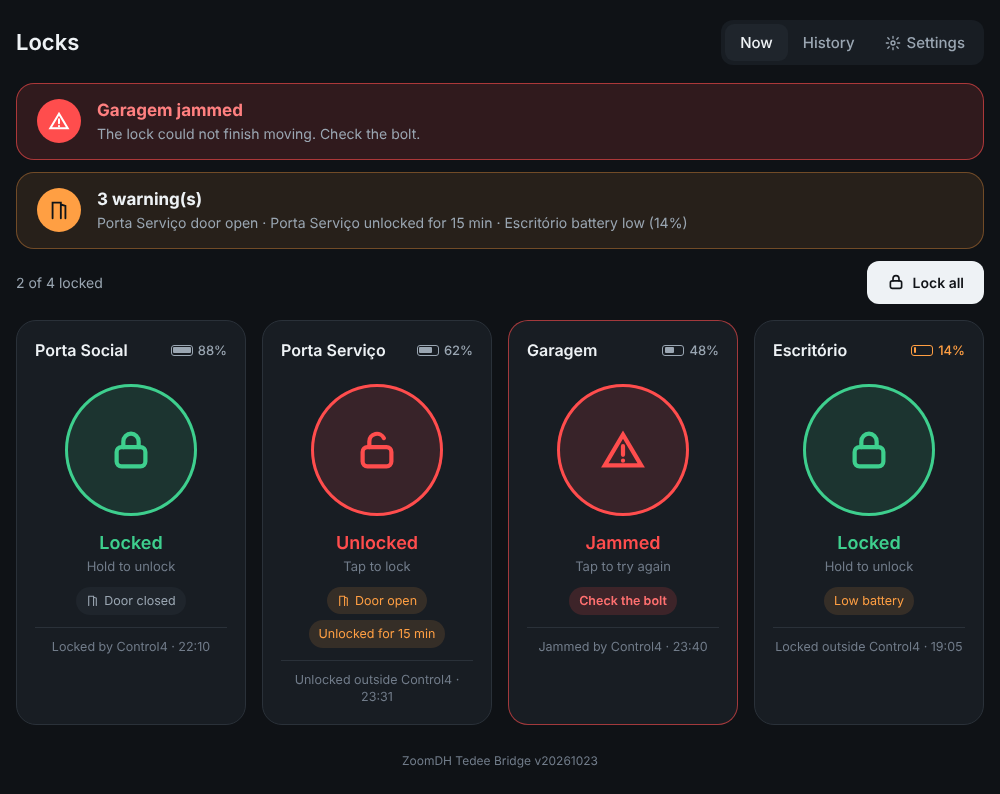
The driver shows its own screen in Control4 Navigator (touch screens, iOS/Android app and browser). To open it, tap the driver icon in Navigator. The screen has three tabs: Now, History and Settings.
Now tab
| Element | Description |
|---|---|
| Top banners | Critical alerts in red (blinking, if enabled in Settings), medium warnings in orange and "All locked" in green when there is nothing to fix. |
| Lock all | Locks every unlocked or jammed lock. |
| Lock card | Name, battery, a large button with the state and the last change (by Control4 or outside it). Tap to lock; hold for 1 second to unlock, which prevents unlocking by accident. While the lock turns, the ring is blue. |
| Tags | Door open/closed (with the Door Sensor), low or critical battery, charging, unlocked for a long time, check the bolt and not responding. |
History tab
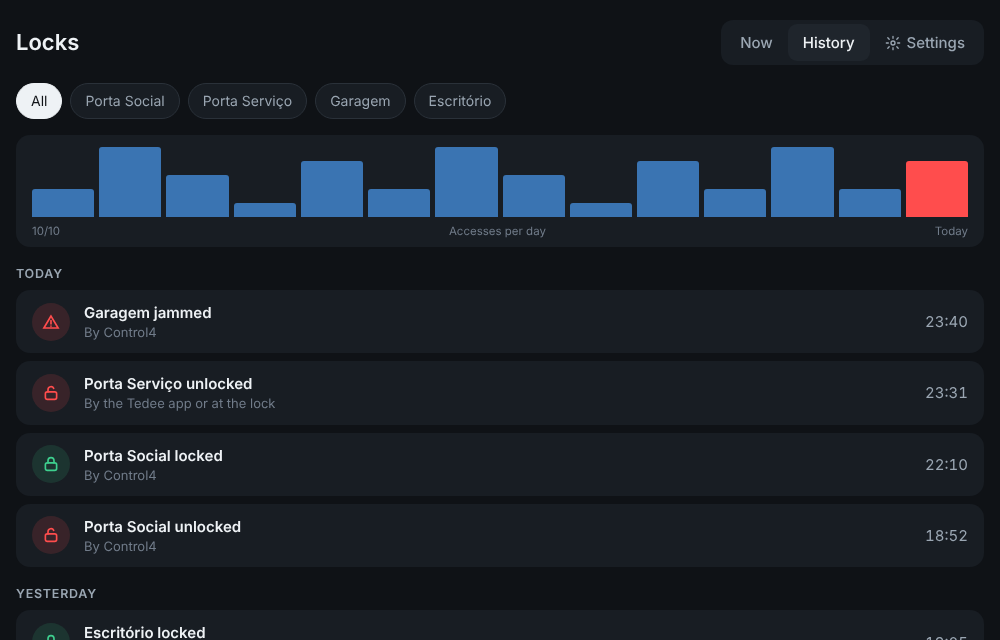
Shows the last 14 days: a chart of accesses per day (days with a jammed lock in red) and a timeline grouped by day, filtered by lock. Each event says whether it was by Control4 or by the Tedee app or at the lock.
About the history: the Bridge local API provides no history and no user who opened the lock. The driver records every state change it receives (up to 1000 events, 60 days) and marks as by Control4 the ones that came from a Control4 command. Events that happen while the controller is off do not appear. To hide a lock from the interface, use the Visible on Interface property of the Universal Smart Lock.
Settings and notifications
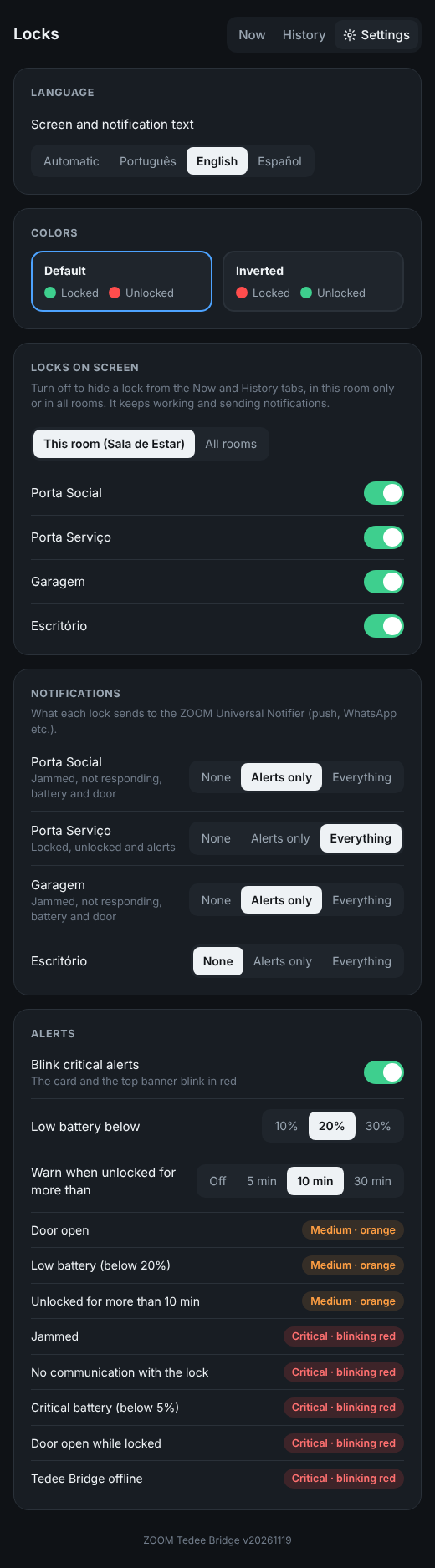
Settings are stored in the driver and apply to every touch screen and phone.
| Setting | Description |
|---|---|
| Language | Automatic (device language), Português, English or Español. Also used for notification text (Automatic sends in Portuguese). |
| Colors | Default: locked in green and unlocked in red. Inverted: locked in red and unlocked in green. |
| Locks on screen | Turns each lock on or off in the Now and History tabs, like in the air conditioning drivers: This room applies only to the room where the screen was opened (the driver recognizes the room when the icon is tapped); All rooms hides it everywhere and is the same option as the Universal Smart Lock Visible on Interface property (changing one changes the other). A hidden lock keeps working and sending notifications. |
| Notifications | For each lock: None, Alerts only (default) or Everything (locked, unlocked and alerts). |
| Blink critical alerts | Turns the blinking of the card and the top banner on or off. |
| Low battery below | 10%, 20% (default) or 30%. |
| Warn when unlocked for more than | Off, 5, 10 (default) or 30 minutes. |
Alert levels
| Situation | Level |
|---|---|
| Door open, low battery, unlocked for a long time | Medium (orange) |
| Jammed, no communication with the lock, critical battery (below 5%), door open while locked, Bridge offline | Critical (blinking red) |
How notifications are sent
Notifications go out through the driver's Notifier connection (ZOOM_NOTIFY). Bind it to the ZOOM Universal Notifier in Composer (Connections tab); the Notifier sends them by push, WhatsApp and other channels. Without that connection nothing is sent, and the Settings tab says so.
Each alert is sent once when it starts. If the condition clears and comes back, it is sent again. Conditions that already existed when the driver started do not send a notification.
Properties
| Property | Description |
|---|---|
| License Key | Driver license key. |
| License Status | License status and update information. |
| Driver Information | Real-time driver status messages. |
| Log Level / Log Mode | Log detail level and destination. |
| IP Address | Tedee Bridge IP on the local network. |
| API Token | Local API token shown in the Tedee app (Bridge → Settings → Local API). The driver uses the Encrypted token mode. |
| Icon Type | Icon shown in Navigator: Tedee, Lock or Key. |
| Poll Interval (s) | Interval (15–600 s) of the safety read of the locks. Changes arrive instantly through the callback; the periodic read fixes lost events and detects the Bridge offline. Default: 60. |
| Connection Status | Online with date/time, Offline desde (offline since), or an error (e.g. API Token recusado, token refused). |
| Locks Found | Number of locks read from the Bridge. |
| Last Access Event | Last state change: [date time] Lock | State via Control4/Tedee. |
| Bridge Serial, Firmware Version, WiFi Version | Data reported by the Bridge. |
| Callback Server IP / Server Port | Address where the driver receives the Bridge callback (controller IP, port 9000 + last digits of the driver ID). |
Actions
| Action | Description |
|---|---|
| Refresh Devices | Reads the Bridge and locks again and checks the callback. Use after adding or removing locks in the Tedee app. |
| List Locks | Prints the locks to the Lua log with ID, serial, firmware, binding and connected Smart Lock. |
| List Callback Servers | Shows this controller's callback and writes to the log (Info level) every callback registered on the Bridge. |
Dynamic connections (ZOOMDH_LOCK)
For each lock on the Bridge the driver:
- Creates a dynamic binding
ZOOMDH_LOCK(IDs from 100) named after the lock. - On the first read, creates a ZoomDH Universal Smart Lock renamed as "Name - ID" and connects both bindings.
- On later reads it reuses the existing Smart Lock, with no duplicates.
The Universal Smart Lock receives state (locked, unlocked, jammed, locking, unlocking), battery, connection and door sensor (Door State connection). The Smart Lock Unlock programming command accepts the Tedee modes: default, force unlock, without auto pull spring and unlock or pull spring.
A jammed lock becomes the Lock proxy fault state, with LAST_FAULT_TYPE = JAMMED on the Smart Lock.
Notifications (ZOOM_NOTIFY)
Fixed Notifier connection (ID 7000, binds automatically when there is a Notifier in the project) to the ZOOM Universal Notifier. See Settings and notifications.
Events
| ID | Event | When it fires |
|---|---|---|
| 1 | Lock Accessed | Any lock locked or unlocked (Control4, app, button or manually). |
| 2 | Bridge Online | The Bridge answers again on the local network. |
| 3 | Bridge Offline | The Bridge stopped answering on the local network. |
Per-lock events (Locked, Unlocked, Access Granted, Door Position Changed, etc.) are on the Universal Smart Lock.
Troubleshooting
| Symptom | What to check |
|---|---|
| Erro: API Token recusado (token refused) | Copy the token again from the Tedee app and make sure Encrypted token is on. The controller clock must be right (the token carries date and time). |
| Offline desde… (offline since) | Bridge IP, network and power. Use a fixed IP or DHCP reservation. |
| State only updates once a minute | The callback is not arriving. Run List Callback Servers and check that the controller address is on the Bridge and the port is not blocked. |
| Smart Lock was not created | Make sure ZoomDH_Universal_Smart_Lock.c4z is in the Drivers folder and run Refresh Devices. |
Licensing
- 720-hour (30-day) trial; remaining time in License Status.
- After purchasing, enter the key in License Key.
- The controller needs internet to activate and re-check the license.
- Once a day, also during the trial, the driver reports technical data of the installation to the license server (controller model and version, driver version, project name and license state). No personal data is sent. When a new driver version is available, it shows in License Status with the link to the driver page on the website.
What the license controls
| Operation | License or trial active | Trial expired |
|---|---|---|
| Reading the Bridge and locks | OK | OK |
| Navigator interface (state and history) | OK | OK |
| Last Access Event property | OK | OK |
| Events (Lock Accessed, Bridge Online/Offline) | OK | Blocked |
| Smart Lock updates | OK | Blocked |
| Notifications | OK | Blocked |
| Lock / unlock commands | OK | Blocked |
Support and Updates
- Website: www.zoomdigitalhome.com.br
- Support: drivers@zoomdigitalhome.com.br
Release Notes
| Version | Date | Description |
|---|---|---|
| 20261119 | 11/19/2026 | Updated link to the ZOOM Universal Notifier: use the Notifier from 11/19/2026 or newer. |
| 20261111 | 11/11/2026 | The driver now reports the installation's technical data to the license server once a day, which speeds up support. It also shows in License Status when a new driver version is available. |
| 20261023 | 10/23/2026 | New Navigator interface: Now, History and Settings tabs, one card per lock (tap to lock, hold 1 second to unlock), Lock all, medium alerts in orange and critical alerts in blinking red, 14-day history as a timeline filtered by lock. Settings tab stored in the driver: language (PT/EN/ES), default or inverted colors, blinking, low battery threshold, unlocked-too-long warning and, per lock, which notifications to send. New Notifier connection (ZOOM_NOTIFY) to the ZOOM Universal Notifier. Choose in the Settings tab which locks appear on the screen, per room or in all rooms. Faster screen opening, a lock with no state is no longer counted as unlocked, and Info log shows only readable events. When the Bridge answers again, changes arrive instantly again. |
| 20261015 | 10/15/2026 | New model, same as Yale Connect: Navigator interface with lock list, Unlock/Lock, battery, door sensor, history by date, daily chart and sharing (PT/EN). Automatically creates and connects one ZoomDH Universal Smart Lock per lock (replaces ZoomDH Tedee Smart Lock). New events Lock Accessed, Bridge Online and Bridge Offline; Icon Type, Poll Interval, Connection Status, Locks Found and Last Access Event properties. Callback answers the Bridge, handles each lock's connection and no longer overwrites other integrations' callbacks. New licensing library and PT/EN HTML documentation. |
| 20260302 | 03/02/2026 | Fixed JSON decoding error in Tedee Smart Lock. |
| 20260115 | 01/15/2026 | Tedee Door Sensor support. |
| 20240404 | 04/04/2024 | Initial version — Tedee Bridge over the local API, with the Tedee Smart Lock driver per lock. |