Integrates air conditioners with a Tuya Wi-Fi module, the ones set up in the Smart Life or Tuya Smart apps, with Control4. Control runs directly over the local network. The Smart Life account is only used to bring in the device list and each device's access key. Each unit gets a ZoomDH – Universal Thermostat, created and configured automatically.
Local control: commands and status go straight from the controller to the air conditioner. After setup, it keeps working without internet and even with the account disconnected.
Smart Life sign-in with a QR code, no password typing.
Finds the air conditioners on the network and creates, connects and names the thermostats with the app names.
Thermostat in Navigator: on/off, modes, fan speeds, setpoint, room temperature and air direction. Each thermostat shows only what the model has.
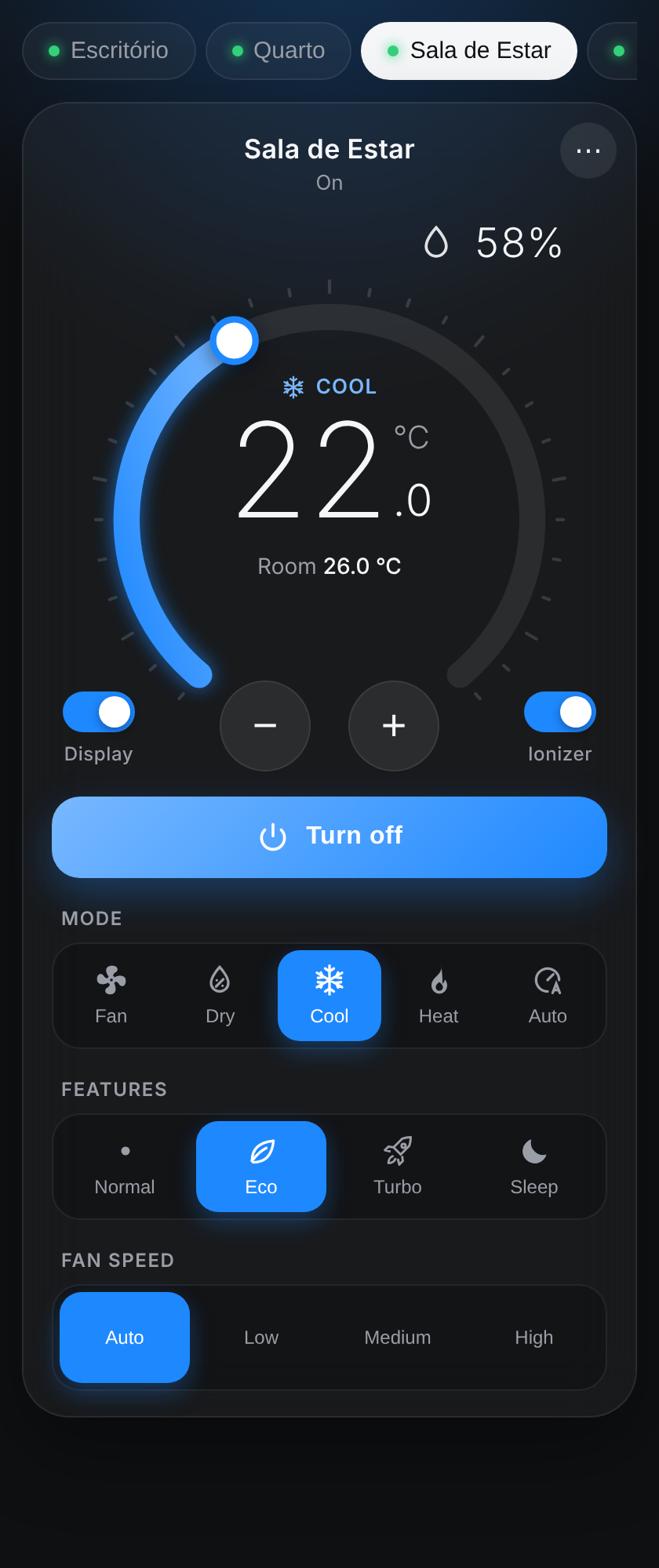
WebView interface in Navigator with the features the thermostat lacks: Eco, Turbo, Quiet, Sleep, display, ionizer and humidity, on the models that have them.
Changes made with the remote or the app show up in Control4 right away.
Interface and setup page in Portuguese and English.
Prerequisites
Air conditioners already set up in the Smart Life or Tuya Smart app and connected to the customer's Wi-Fi.
Compatible brands: any brand whose Wi-Fi module is Tuya. Rule of thumb: if the unit pairs with the Smart Life app, it works with this driver. If the brand has its own app built on Tuya, add the unit to Smart Life as well.
Access to the customer's Smart Life account (the phone app, to scan the QR) for the first setup.
Air conditioners and controller on the same network. Reserving each unit's IP on the router is recommended.
Controller with internet access for the first setup (and when a unit is set up again in the app).
ZoomDH_Universal_Thermostat.c4z driver installed in Composer (the gateway adds it to the project).
ZoomDH license key (without a key, the driver runs in trial mode for 30 days).
Installation
Add the ZoomDH – Tuya AC Wi-Fi Gateway driver to the project, in the room where the thermostats should be created.
Open the Setup Page URL address in a browser on the customer's network and connect the Smart Life account (see Smart Life account).
As soon as the account connects, the driver brings in the account's air conditioners and looks for each one on the network (about 15 seconds).
For each air conditioner, the gateway creates a Universal Thermostat, connects it to HVAC Thermostats and selects the unit.
To change the names, use Rename on the setup page.
To add a thermostat manually: add the Universal Thermostat, connect its HVAC Gateway connection to the gateway's HVAC Thermostats and pick the unit in the Device property.
Refresh the Navigators to see the thermostats and the WebView interface.
If a unit is not found on the network, Status shows which ones have no IP. Enter their IPs in Device IP Addresses; the driver searches again on its own.
Smart Life account
In the customer's Smart Life (or Tuya Smart) app, open Me › gear (Settings) › Account and Security and copy the User Code.
On the setup page, paste the User Code and tap Create QR to sign in.
In the app, tap the scanner (top right of the home screen), scan the QR and confirm. The page shows Connected within a few seconds.
The QR is valid for a few minutes. If it expires, create another one.
Once connected, the account is only used to fetch new units and the key of a unit that was set up again in the app.
To switch accounts, use Disconnect account on the page or the Disconnect Tuya Account action. Units already set up keep working.
WebView interface
The driver shows up in Navigator as a button that opens the air conditioner interface: one tab per unit, setpoint dial, modes, fan speed, Normal/Eco/Turbo/Quiet/Sleep, display, ionizer, room temperature and humidity. Each unit shows only what the model has. The color follows the mode. The ⋯ menu holds the air direction and the language. The interface also opens away from home, through the Control4 app.
The default language comes from the Language property. It can be changed in the interface's ⋯ menu, and the choice is saved on that device.
Eco, Turbo and the other features only take effect in the modes the air conditioner itself accepts.
Air conditioners per room
When the same driver appears in several Navigator rooms, you can choose, per room, which air conditioners appear in the interface and which one opens first. This is on the setup page, in the Interface rooms box.
A room joins the box on its own the first time the interface is opened in it. It can also be added from the project's room list.
Check the air conditioners that should appear and pick the default. A room with no setting shows all of them.
Properties
Property
Description
License Key
ZoomDH license key.
License Status / Driver Information
License or trial status.
Driver Name / Driver Version
Installed driver name and version.
Language
Default language of the WebView interface, the setup page and Status (Português or English).
Log Level / Log Mode
Log level and destination.
Status
Account, search and last reading status.
Tuya User Code
User Code from the Smart Life app. Filled in by the setup page.
Tuya Account
Shows whether the Smart Life account is connected.
Poll Interval
Device reading interval in seconds (3 to 300, default 10).
Auto Create Devices
Yes: creates and connects a Universal Thermostat for each new unit. No: only lists the units; thermostats are added manually.
Discovered Devices
Units in the account and each one's IP.
Device IP Addresses
Optional. IPs of units the search does not find on its own, comma separated.
Web Page Port
Setup page port on the local network (default 8104).
Web UI URL / Setup Page URL
Interface and setup addresses, with the access key.
Actions
Action
Description
Discover Devices
Fetches the account's air conditioners, looks for each one on the network and creates the missing thermostats.
Log Raw Status
For ZoomDH support (requires ZOOMDH Debug).
Resend Web URL
Sends the interface address to the Control4 app again. Use it if the WebView keeps loading after adding or updating the driver (and close and reopen the app).
New Web Key
Changes the access key of the setup addresses (the old addresses stop working).
Forget Devices
Clears the unit list. Thermostats stay in the project and go back to the same unit on the next search.
Disconnect Tuya Account
Disconnects the Smart Life account. Units already set up stay on local control.
Connections
Connection
Use
HVAC Thermostats
Single connection for all thermostats: connect each ZoomDH – Universal Thermostat's HVAC Gateway connection to it.
Troubleshooting
The QR does not show up or a User Code error appears: check the User Code in the app (Me › Settings › Account and Security) and that the controller has internet.
Account connected but no air conditioners: the unit must be in the account that scanned the QR. If it is in another brand app, add it to Smart Life.
Unit without IP: check that it is on the controller's network. If it is on another network, enter the IP in Device IP Addresses.
Unit stopped responding after being set up again in the app: the access key changes when the unit is paired again. With the account connected, the driver fetches the new key on its own; without the account, connect it again and run Discover Devices.
Unit offline after working: the IP may have changed. The driver searches again on its own; to avoid it, reserve the IP on the router.
An app feature does not show up: the driver shows the features the model reports to the account. Features outside the Tuya standard may not appear.
Commands ignored and a license warning in the interface: the trial ended or the key is invalid. Check License Key and License Status.
WebView keeps loading in the app: run Resend Web URL and close and reopen the app.
Licensing
ZoomDH license per controller, entered in License Key. Without a key, the driver runs in trial mode for 30 days.
Without a valid license
Effect
Periodic reading
Stopped: thermostats get no new status.
Commands (thermostats and WebView interface)
Ignored. The interface shows the license warning.
Account, device search and setup page
Keep working.
The Universal Thermostats have no license of their own: they use the gateway's.
First version: local control of Tuya/Smart Life Wi-Fi air conditioners, account sign-in with a QR code, automatic network search, single HVAC Thermostats connection with automatic creation of the ZoomDH Universal Thermostats, WebView interface in Português/English (also opens away from home, with air conditioner choice per room) and ZoomDH license.