Integration driver for the Yale Connect Hub. Acts as a gateway driver in Control4, automatically discovering all locks linked to the Yale Connect account and creating a ZoomDH Universal Smart Lock instance for each discovered lock.
Communication via Cloud (Yale Connect Brazil API) — authentication, lock/unlock commands, access logs. Also uses UDP broadcast on the LAN as a fallback when available, for lower latency on local events.
Supported lock models: all Yale Zigbee models (YMF 30, YMC 420W, LIA, YDF 40, Gemini Mini, etc.). New Zigbee models should work automatically.
Prerequisites
Yale Connect Hub activated and linked to the Yale Connect account (official app).
Yale Zigbee locks already paired with the hub via app.
Control4 controller and Yale hub on the same local network (LAN).
Yale Connect account (email and password) with access to the installation.
Internet access on the controller for Cloud authentication and license activation.
Installation
Add the ZoomDH – Yale Connect Hub driver to the project in Composer Pro.
Fill in the Email and Password properties with the Yale Connect account credentials.
The driver authenticates automatically, discovers all locks and creates a ZoomDH Universal Smart Lock instance for each — already renamed as "Name - deviceId" and wired to the correct binding.
Enable the Navigator UI in every room where the client should see it.
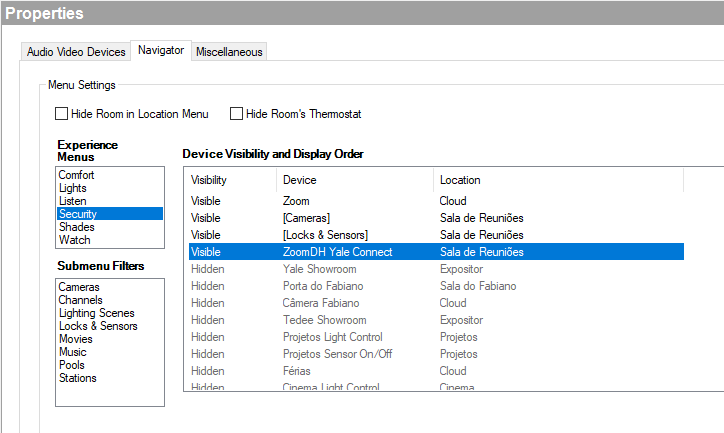
In Composer, select the room (e.g. Meeting Room) → Navigator tab → Menu Settings →
experience Security → set ZoomDH Yale Connect row to Visible.
Composer Pro: Navigator → Menu Settings with ZoomDH Yale Connect set as Visible in the Meeting Room, under the Security experience.
The driver belongs to the Security category by default. If the client prefers to see it under another experience (Comfort, Watch, etc.) just set it on the same screen.
Requirement: the ZoomDH Universal Smart Lock driver (ZoomDH_Universal_Smart_Lock.c4z) must be in the %HOMEPATH%\Documents\Control4\Drivers folder. It is created and wired automatically — no need to add it manually.
Navigator interface
Tap the Yale Connect icon in Navigator (touch screen, mobile app or browser). The screen has three tabs: Now, History and Settings.
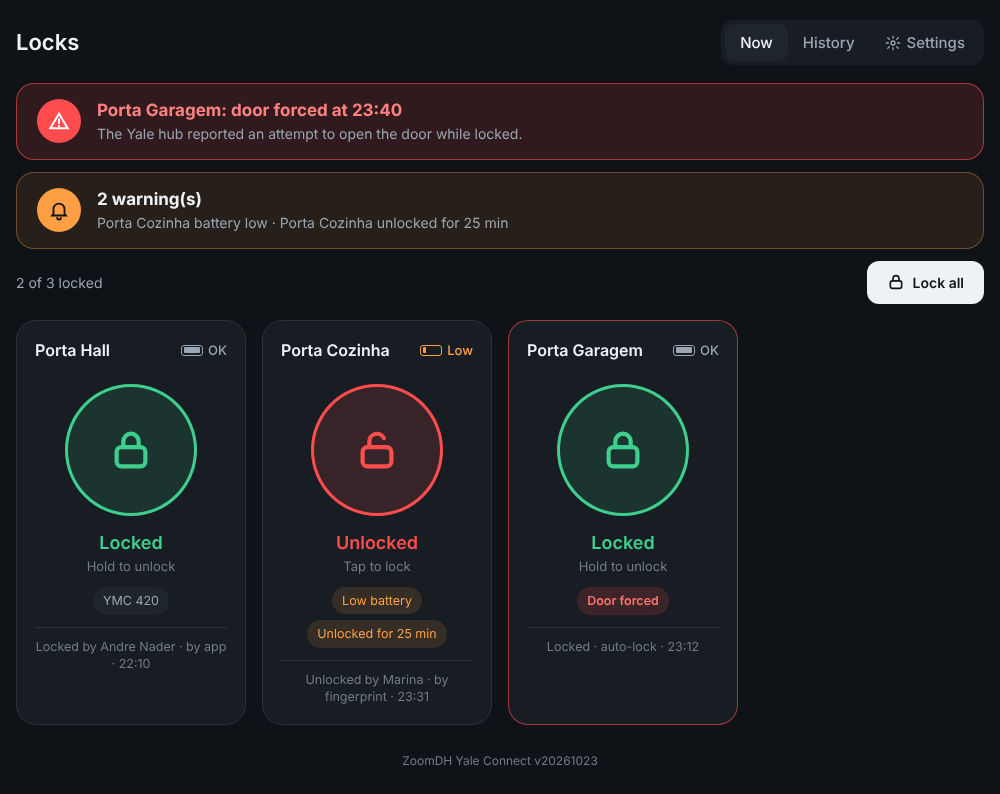
Now tab: warnings at the top and one card per lock.
Now tab
Lock: tap the circle of an unlocked lock.
Unlock: hold the circle for 1 second (the ring fills up), so nobody unlocks by accident.
Lock all locks every unlocked lock at once.
Each card shows the state, the battery (OK or Low, since Yale does not report a percentage) and the last operation with user, access method (app, fingerprint, keypad, card, key, auto-lock) and time.
Default colors: green = locked, red = unlocked (can be inverted in Settings).
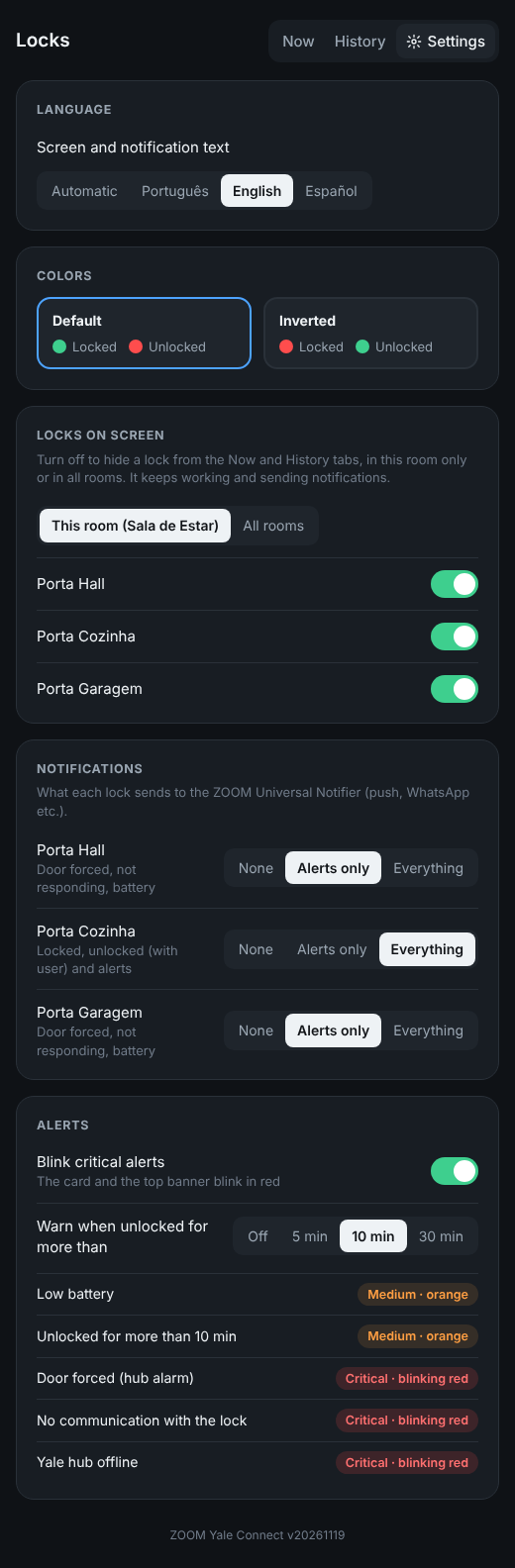
Medium alerts show in orange: low battery and unlocked for longer than configured.
Critical alerts blink in red: door forced, lock not responding and Yale hub offline.
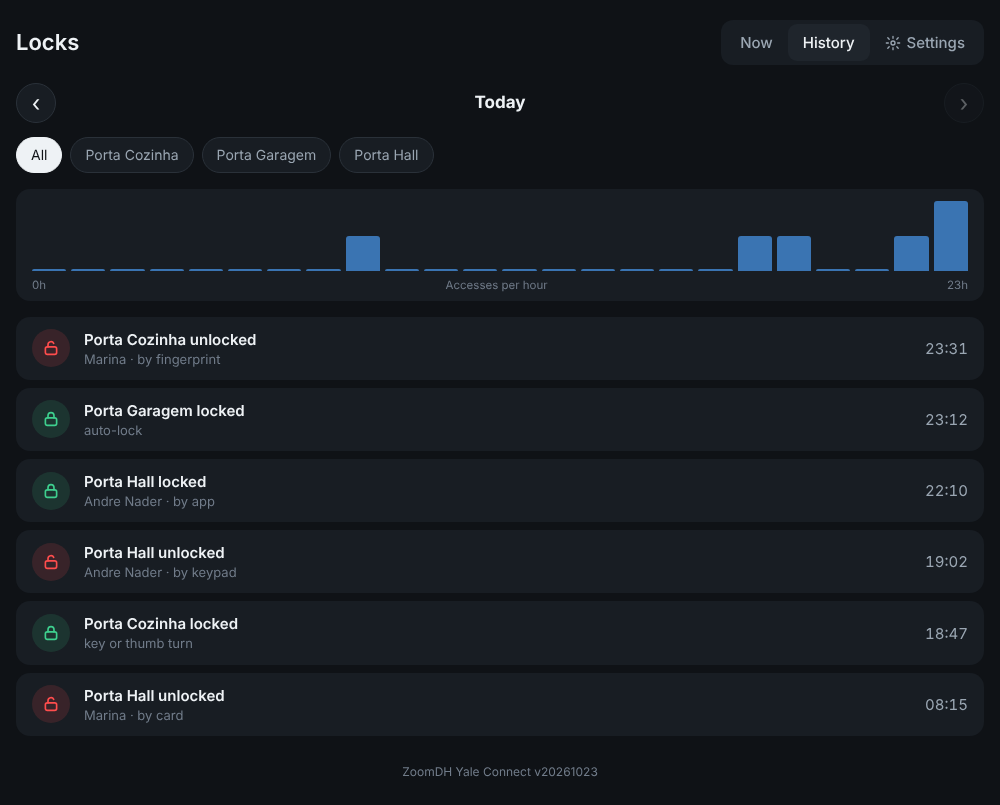
History tab: the day's accesses with user and access method.
History tab
Shows the accesses recorded in the Yale account, one day at a time (use ‹ and › to change the day). There is a chart of accesses per hour and a filter by lock.
Settings and notifications
Settings tab.
Settings are stored in the driver and apply to every touch screen and phone.
Setting
Options
Language
Automatic, Português, English or Español. Applies to the screen and to the notification text.
Colors
Default (locked green, unlocked red) or Inverted.
Locks on screen
Turns each lock on or off in the Now and History tabs, like in the air conditioning drivers: This room applies only to the room where the screen was opened (the driver recognizes the room when the icon is tapped); All rooms hides it everywhere and is the same option as the Universal Smart Lock Visible on Interface property (changing one changes the other). A hidden lock keeps working and sending notifications.
Notifications
For each lock: None, Alerts only (default) or Everything (locked and unlocked, with the user, plus alerts).
Blink critical alerts
Turns the red blinking on or off.
Warn when unlocked for more than
Off, 5, 10 (default) or 30 minutes.
Notifications go out through the driver's Notifier connection (ZOOM_NOTIFY) to the ZOOM Universal Notifier, which sends them by push, WhatsApp and other channels. Without a Notifier bound nothing is sent, and the Settings tab says so. Each alert is sent once, when it starts.
Multi-Hub
The driver supports multiple Yale hubs in the same installation (each hub may have its own account or share one). Use the Show Detected Hubs action to list all hubs detected via UDP broadcast, with IP, hardware/firmware identification and time since last broadcast.
Duplicate protection: only one Yale Connect Hub stays active per project. If two drivers are added by mistake, the second enters "DUPLICATE" mode (visible in Connection Status) — no Yale API calls are made, avoiding duplicated traffic. A periodic timer detects if the duplicate is removed and reactivates the driver automatically.
Properties
Property
Description
License Key
Driver license key.
License Status
License status and update info.
Driver Information
Real-time driver status messages.
Log Level
Log detail level (0=Fatal … 5=Trace).
Log Mode
Log destination: Off / Print / Log / Print and Log.
Email
Yale Connect account email.
Password
Yale Connect account password.
Icon Type
Icon shown on the Navigator: Yale, Lock or Key. Changes at runtime without reload.
Poll Interval (s)
Interval (1–30 seconds) between reads of the UDP socket that receives broadcasts from the Yale hub. Lower values (1–2s) reduce local event latency; higher values (10–30s) reduce CPU usage on larger projects. Default: 5s. Changing at runtime restarts the timer immediately — no driver reload needed.
Connection Status
Last authentication status (Online + date/time, HTTP error, DUPLICATE, or Reactivated).
Locks Found
Number of locks discovered after the last login.
Last Access Event
Last access event — format: [date time] Lock | Action via Method | User Name.
Actions
Action
Description
Refresh Devices
Forces a new Yale Connect API login and lock re-discovery. Use after adding/removing locks in the Yale app.
Show Detected Hubs
Lists in the Lua log all Yale Connect hubs detected via UDP broadcast.
Show Lock Mapping
Shows the learned mapping between the UDP TYPE byte and the locks.
Dynamic Connections (ZOOMDH_LOCK)
For each registered lock, the driver:
Creates a dynamic binding of type ZOOMDH_LOCK.
Creates — automatically on first discovery — a ZoomDH Universal Smart Lock instance renamed as "Lock Name - deviceId" (prevents collisions when multiple locks share the same name in the Yale app).
On subsequent reloads/refreshes, reuses the existing Smart Lock — does not duplicate.
Notifier (ZOOM_NOTIFY)
Fixed Notifier connection (ID 7000, binds automatically when there is a Notifier in the project). See Settings and notifications.
Events
The driver has two sets of connectivity events:
Cloud = Yale Connect API — depends on controller internet and valid auth.
Hub = physical Yale Connect Hub on the LAN — depends on power and local network.
ID
Event
When it fires
1
Lock Accessed
Any lock was accessed (PIN, app, biometrics, tag, auto-lock).
2
Cloud Online
Yale API resumed after being offline.
3
Cloud Offline
Yale API stopped responding (network error, HTTP error, invalid auth).
4
Hub Online
Physical hub resumed UDP broadcast on the LAN. Identify which via LAST_HUB_ONLINE_IP/LAST_HUB_ONLINE_INFO.
5
Hub Offline
Physical hub silent for over 90s. Identify which via LAST_HUB_OFFLINE_IP/LAST_HUB_OFFLINE_INFO.
Programming example
When  ZoomDH Yale Connect → "Hub Offline"
Do    Push Notification: "Yale hub offline: " + [LAST_HUB_OFFLINE_IP]
Licensing
720-hour (30-day) trial included; remaining time shown in License Status.
After purchasing a license, enter the key in License Key. Status changes to Activated.
The controller needs internet access for activation and periodic re-check.
Once a day, also during the trial, the driver reports technical data of the installation to the license server (controller model and version, driver version, project name and license state). No personal data is sent. When a new driver version is available, it shows in License Status with the link to the driver page on the website.
Updated link to the ZOOM Universal Notifier: use the Notifier from 11/19/2026 or newer.
20261111
11/11/2026
The driver now reports the installation's technical data to the license server once a day, which speeds up support. It also shows in License Status when a new driver version is available.
20261026
10/26/2026
New Navigator screen with Now, History and Settings tabs, choice of which locks are shown and per-lock notifications with the ZOOM Universal Notifier. Lock states always match the Yale app, right after the driver loads. Faster reconnection when the Yale account doesn't respond. Simpler log.
20261012
10/12/2026
Navigator interface with the lock list, lock and unlock, history and daily activity, in Portuguese and English. Choice of icon and of which locks are shown. Licensing update.
20260819
08/19/2026
More reliable commands and up-to-date state even on networks that block the hub's messages.