
ZoomDH – Universal Notifier v20261023
Overview
ZoomDH Universal Notifier is the notification hub for ZoomDH drivers. Locks, alarms, sensors and other ZoomDH drivers report their events to it, and the Notifier sends them to the chosen channels:
- Control4 Push (the customer's Control4 app)
- WhatsApp (TextMeBot, Whapi.Cloud or CallMeBot)
- Telegram (the customer's own bot)
- Webhook (for Home Assistant, n8n and other services)
Every notification has a severity: Critical (jammed lock, device offline, alarm), Warning (low battery, door left open) or Info (lock unlocked or locked). The customer chooses, on a Navigator screen, what goes to each channel. There are also quiet hours, pause and protection against repeated alerts.
The driver is free, and a single Notifier serves every ZoomDH driver in the project.
Prerequisites
- One or more ZoomDH drivers with the Notifier connection (e.g. ZoomDH Tedee Bridge, ZoomDH Yale Connect).
- For push: the Control4 Push Notification agent in the project and the customer using the Control4 app.
- For e-mail: the Control4 Email Notification agent set up in the project.
- For WhatsApp: an account with one of the supported services (TextMeBot, Whapi.Cloud or CallMeBot) and its access key.
- For Telegram: a bot created on Telegram (@BotFather) and the IDs of the chats that will receive.
- Internet on the controller for WhatsApp, Telegram and webhook.
Installation
- Add the ZoomDH – Universal Notifier driver to the project in Composer Pro (one per project).
- In the Connections tab, connect the Notifier connection of each ZoomDH driver to the Notifications connection of the Universal Notifier. Several drivers can share the same connection.
- In the properties, fill in Home Name (shown at the start of each alert) and enable the channels you want (see Setting up the channels).
- Run the Send Test Notification action to check that the channels receive it.
- Enable the interface in Navigator: select the room → Navigator tab → Menu Settings → set ZoomDH Universal Notifier as Visible in the desired experience (e.g. Security).
Each connected driver shows up in the interface, with the list of events it can generate, a few seconds after being connected. If it does not, run the Refresh Connected Drivers action.
How notifications are chosen
The choice happens in two places:
- In the source driver itself (e.g. the lock). On the driver's settings screen, or in the Send Notifications property, the customer chooses whether the driver reports all events (every lock and unlock), alerts only (default: critical and warnings) or nothing, and can turn each event on or off.
- In the Universal Notifier, which decides which channels each event goes to.
In the Notifier, each alert goes through these rules, in this order:
| Rule | What it does |
|---|---|
| Pause | While notifications are paused nothing is sent, but everything stays in the history. |
| Driver off | A whole driver can be turned off on the What to send screen. |
| Do not repeat | The same event from the same device is not sent again within the chosen time (default 10 min). |
| Quiet hours | During the chosen period only critical alerts go out (if allowed). |
| Channel | For each channel, the choice made for that event applies (always or never). With no choice (automatic), the channel's minimum severity set in Composer applies. |
Navigator interface
Tap the Notifier icon in Navigator (touchscreen, iOS/Android app). The screen has three tabs and the PT / EN / ES languages.
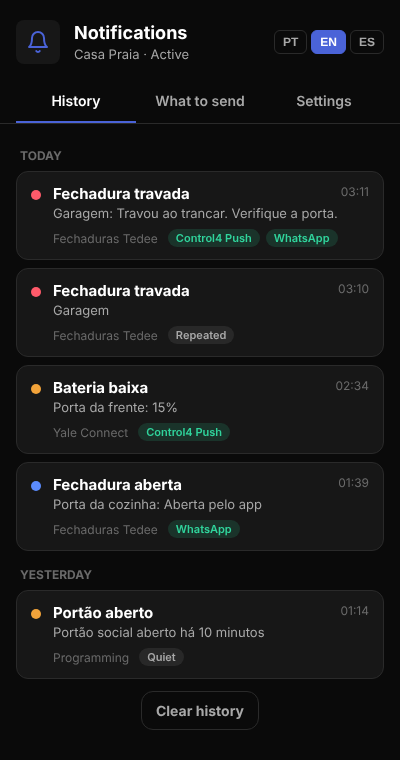
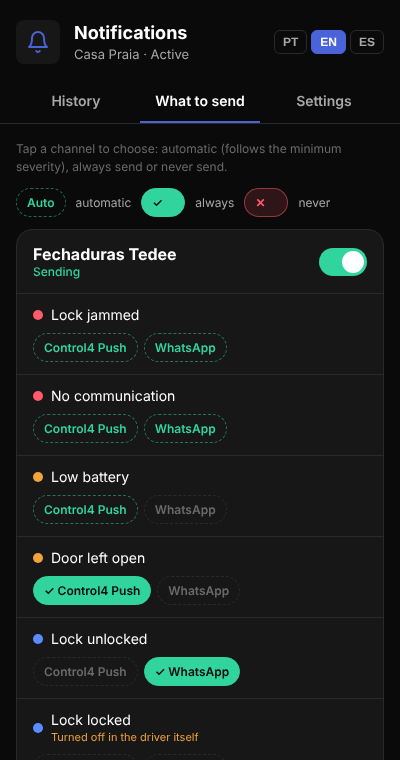
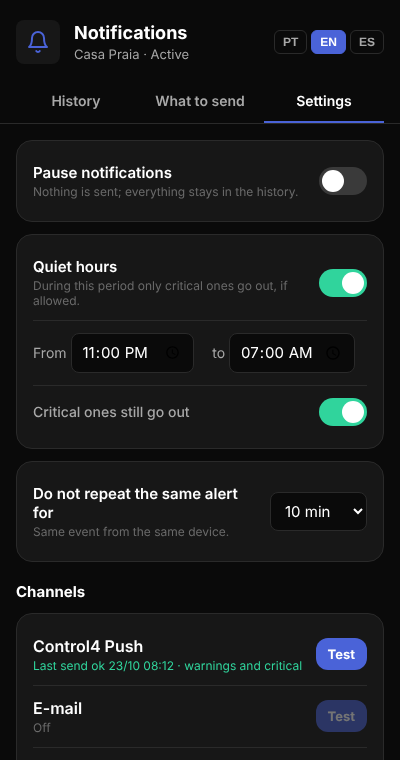
On the What to send tab, an event turned off in the source driver itself shows Turned off in the driver itself: to receive it, turn it on in that driver's settings screen.
Setting up the channels
Control4 Push
On by default. It uses the project's Push Notification agent: add the agent and the users in Composer. Default minimum severity: warnings and critical.
Set up the Control4 Email Notification agent (outgoing server). In the Notifier, turn on Email Enabled and fill in Email Recipients with one or more addresses separated by comma.
- TextMeBot: create the account at textmebot.com, authorize the sending number and copy the API key.
- Whapi.Cloud: create a channel at whapi.cloud, connect the sending WhatsApp and copy the token.
- CallMeBot: free, but the key works for a single number (the first one in the list).
Turn on WhatsApp Enabled, choose the WhatsApp Service, paste the key in WhatsApp API Key and fill in WhatsApp Numbers with country and area code (e.g. 5551999998888), separated by comma. Messages go out a few seconds apart, as the services require.
Telegram
Create a bot with @BotFather and copy the token to Telegram Bot Token. Each person (or group) must send a message to the bot first; then put the chat ID in Telegram Chat IDs (several separated by comma).
Webhook
Fill in Webhook URL with the address that will receive the alerts. Each alert is sent with home, severity, title, message, source and date/time.
Properties
| Property | Description |
|---|---|
| Driver Information | Driver messages, such as a channel failing to send. |
| Log Level / Log Mode | Log detail level and destination. |
| Status | Active or Paused. |
| Connected Drivers | How many drivers are connected to the Notifier. |
| Last Notification | Date, time and title of the last alert received. |
| Push Agent / Email Agent | OK when the Push Notification or Email Notification agent was found in the project; Not found when the agent still needs to be added. |
| Home Name | Name shown at the start of each alert (e.g. Beach House - Lock jammed). |
| Repeat Suppression (min) | Time (0–120 min) during which the same event from the same device is not sent again. 0 turns it off. Default: 10. |
| Quiet Hours, Quiet Hours Start, Quiet Hours End | Quiet hours (HH:MM format, may cross midnight). |
| Critical During Quiet Hours | Whether critical alerts are sent even during quiet hours. Default: Yes. |
| Push Enabled / Push Minimum Severity | Turns on Control4 push and its minimum severity in automatic mode. |
| Email Enabled, Email Recipients, Email Minimum Severity | E-mail: recipients separated by comma. |
| WhatsApp Enabled, WhatsApp Service, WhatsApp API Key, WhatsApp Numbers, WhatsApp Minimum Severity | WhatsApp: service, key and numbers. |
| Telegram Enabled, Telegram Bot Token, Telegram Chat IDs, Telegram Minimum Severity | Telegram: bot token and chats. |
| Webhook Enabled, Webhook URL, Webhook Minimum Severity | Webhook: destination address. |
Minimum severity: Critical Only, Warning and Critical or All. Quiet hours and the repeat window can also be changed by the customer in the interface.
Actions
| Action | Description |
|---|---|
| Send Test Notification | Sends a test alert (critical) to every enabled channel. |
| Refresh Connected Drivers | Asks every connected driver for its event list again. |
| Forget Disconnected Drivers | Removes from the interface the drivers that are no longer connected, along with the choices made for them. |
| Clear History | Clears the notification history. |
Commands, connections and events
Programming commands
| Command | Description |
|---|---|
| Send Notification | Sends a programming alert with severity (Critical, Warning or Info), title and message. It shows up in the interface as Programming and follows the same rules. |
| Pause Notifications / Resume Notifications | Pauses and resumes sending (e.g. pause while the family is home). |
Connections
| Connection | Description |
|---|---|
| Notifications | Receives the Notifier connection of ZoomDH drivers. Accepts several drivers. |
Events
| Event | When it fires |
|---|---|
| Notification Received | Any alert arrived (even if paused or filtered). |
| Critical Notification | A critical alert arrived. |
Variables: LAST_TITLE, LAST_MESSAGE, LAST_SEVERITY and PAUSED, for use in programming.
Troubleshooting
| Symptom | What to check |
|---|---|
| Connected driver does not show in What to send | Check the connection in the Connections tab and run Refresh Connected Drivers. The source driver must be on a version that supports the Notifier. |
| Alert shows in the history as No channel | No enabled channel accepts that severity. Lower the channel's minimum severity or mark always on the event. |
| Lock and unlock alerts do not arrive | By default drivers report alerts only. On the lock driver's settings screen, choose all events or turn on the desired event. |
| Push does not arrive | Check the Push Notification agent in the project and that the user has the Control4 app with notifications allowed. |
| WhatsApp or Telegram shows Failed in Settings | Check the key or token and the numbers. On Telegram, the person must have sent a message to the bot first. |
Licensing
ZoomDH Universal Notifier is free to use with ZOOM drivers and needs no license of its own: it only sends when at least one licensed (or trial) ZOOM driver is bound to the Notifications connection. Without one, the status shows "Waiting for a licensed ZOOM driver" and the history lists notices as "No ZOOM driver". Source drivers keep their own licenses. WhatsApp services may charge separately, depending on the customer's plan.
Support and Updates
- Website: www.zoomdigitalhome.com.br
- Support: drivers@zoomdigitalhome.com.br
Release Notes
| Version | Date | Description |
|---|---|---|
| 20261023 | 10/23/2026 | Initial version: Control4 push, e-mail, WhatsApp, Telegram and webhook; per-event and per-channel choice on the Navigator interface (PT/EN/ES); quiet hours, pause, repeated-alert protection and history. Replaces the ZoomDH WhatsApp Message driver. |