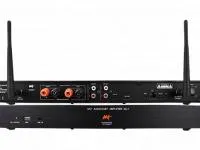
This driver integrates the Wave WMR audio multiroom with Control4, through the RS-232 serial interface or over IP through the Wave WMR-W232 module.
It controls zones, sources and volume, including bass and treble adjustment right in the Navigator interfaces.
Installation
- For serial control, connect the WMR to the controller with a 3-wire straight-through cable (pin 2 TX, pin 3 RX, pin 5 common)
- For IP control, install and configure the Wave WMR-W232 module and enter its IP and port in “IP Address” and “TCP Port”
- To show bass and treble, in System Design select the room, open the “Navigator” tab and check “Show EQ in Navigator”
- Refresh the navigators and start a new session
Features
- Control over RS-232 serial or IP through the Wave WMR-W232 module
- Control of up to 18 zones (3 WMR66 in parallel)
- Bass and treble adjustment in the Navigator interfaces
- Configurable volume ramp
- Digital optical audio inputs
- Volume commands automatically turn mute off
Requirements
- 3-wire straight-through serial cable (9600 baud) or Wave WMR-W232 module for IP control
More details about this driver: drivers@zoomdigitalhome.com.br