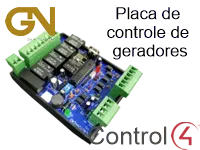
Driver for integrating GN Automação generator controllers with Control4 over IP, to control and monitor the generators.
The driver icon in Navigator cycles through the generator status, the load supply, the mains and the battery. With the tank capacity and consumption entered, the driver estimates the fuel and time left.
Installation
- Add the driver to the desired room and choose, in the Navigator settings in Composer, where the generator icon will be shown.
- Enter the controller board “IP Address”, “Http Port” (default 80) and “Password”.
- Adjust “Status Update Interval (s)” and the “UiButton Double Tap” action.
- For fuel monitoring, fill in “Fuel Tank Capacity (l)”, “Fuel Consumption (l/h)” and “Fuel Tank Low Level (l)”.
Features
- Monitoring of generator, load, mains and battery status
- Navigator icon that cycles through the status information
- Automatic/manual mode commands and load transfer between mains and generator
- Configurable double-tap action on the icon
- Fuel level and estimated time left in the tank
- Low battery alert based on a configurable minimum voltage
More details about this driver: drivers@zoomdigitalhome.com.br