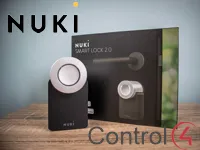
This driver controls Nuki Smart Lock 2.0 and 3.0 from Control4, through the Nuki Wi-Fi Bridge and local communication.
The bridge and locks are discovered automatically; just select the lock and the driver configures itself. No Nuki account is needed.
Installation
- Set up the lock and pair it with the Nuki Bridge in the Nuki app
- Enable “API Quick Discovery” and “HTTP API” in the Bridge settings in the app
- In the driver properties, select the Bridge in “Bridge Selector” (if it does not appear, use the “Discover Bridges” action)
- Wait a few seconds and select the lock in “Lock Selector”; the driver configures itself automatically
Features
- Lock and unlock control of the Nuki lock
- Automatic discovery of the Nuki Bridge and locks
- Self-configuration when the lock is selected in "Lock Selector"
- Optional manual bridge IP to force a local connection
- Configurable status polling interval, with no impact on the battery
Requirements
- Nuki Bridge with the lock already paired through the Nuki app
- API Quick Discovery and HTTP API enabled on the Nuki Bridge
- Secure local Wi-Fi network, with no port forwarding or WAN access
More details about this driver: drivers@zoomdigitalhome.com.br