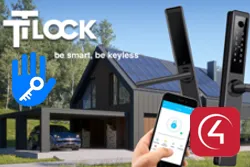
TTLock provides smart lock technology used by hundreds of manufacturers, in door locks, padlocks, access keypads, cylinders, glass door locks and many other types.
With this driver, TTLock-compatible locks are integrated with Control4 with two-way control and feedback.
Installation
- Create an account on the TTLock cloud service (TTLock app or the lock manufacturer’s app), using an e-mail address and an administrator account
- Add the lock and the hub to the account in the app
- Enable “Remote Unlock” in the lock settings (near the lock, over Bluetooth)
- Enable “Auto Lock” and set the delay, if desired
- In the driver, fill in the TTLock account “Username” and “Password”
- Choose the lock in “Select Lock”
Features
- Lock and unlock
- Current lock state
- Battery level (0 to 100%)
- Programming actions
- Lock selected from those registered in the account
- Configurable status polling interval
- Works with locks from many manufacturers that use TTLock
Requirements
- Control4 OS 3.3.2 or later
- TTLock Hub/Gateway
- TTLock administrator account with an e-mail address
- TTLock Cloud driver
More details about this driver: drivers@zoomdigitalhome.com.br